

Function Calling in Production: Implementation Patterns That Actually Work
When Your Chatbot Needs to Actually Do Things

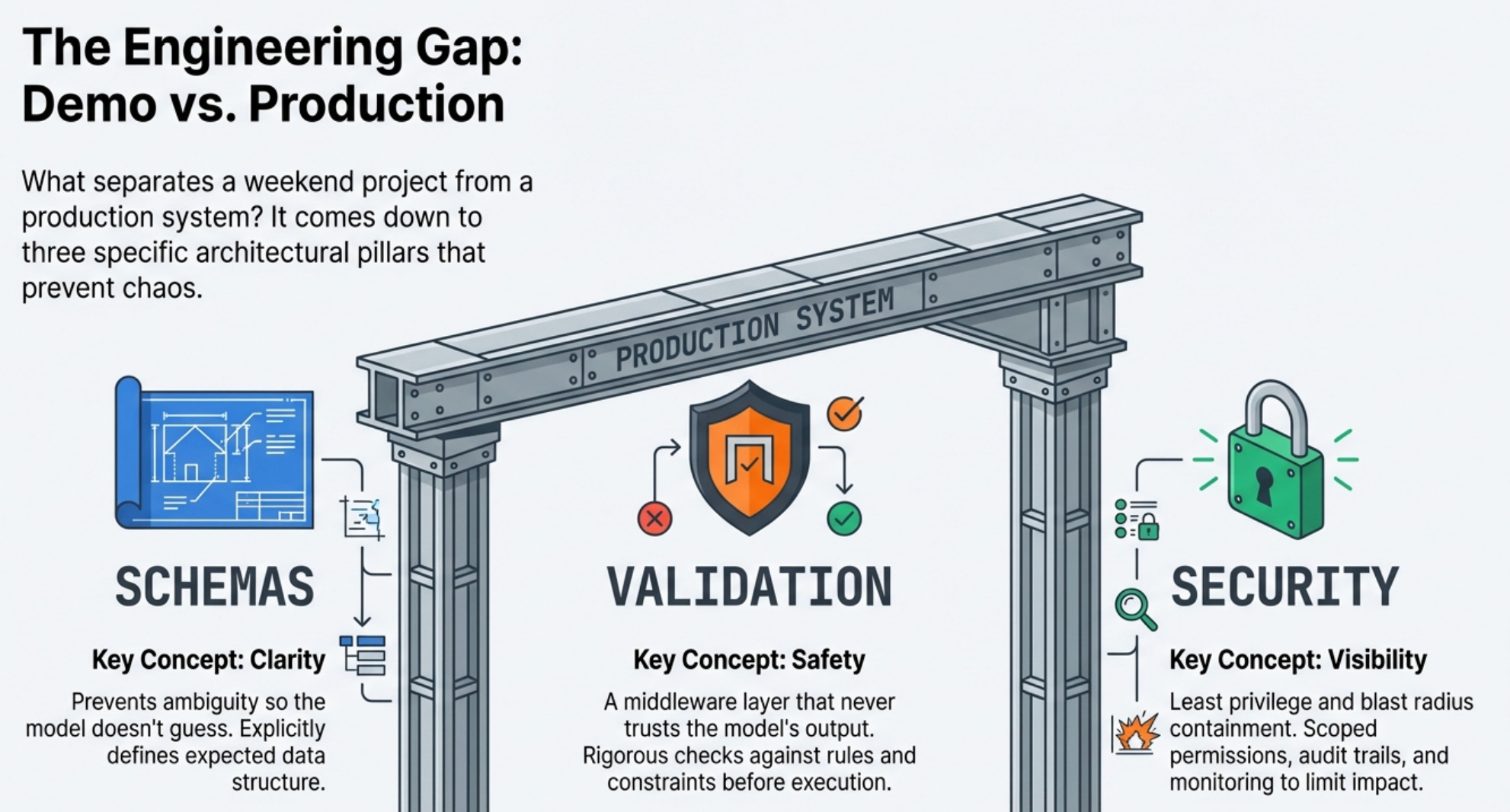
In Part 1, we covered what function calling is and why it’s powerful, the ability to turn an LLM from a text generator into something that can query databases, trigger workflows, and take real actions in your systems.
Now let’s talk about how to actually build this without creating the kind of production incidents that require explanatory Slack messages at 3 AM.
The difference between a function calling demo and a production system comes down to three things:
Schemas that prevent the model from doing stupid things
Security that prevents it from doing dangerous things
Monitoring that tells you when it’s doing unexpected things.
Let’s break down each one.
Designing Function Schemas That the LLM Can Actually Use
The function schema is where most implementations either succeed or fail because the LLM only knows what you tell it, and if your schema is ambiguous or incomplete, the model will make assumptions that surprise you in production.
My first schema for a user query function looked like this:
{
  "name": "query_users",
  "description": "Query the user database",
  "parameters": {
    "query": {"type": "string", "description": "Search query"}
  }
}
This felt reasonable when I wrote it.
It’s concise and clear, and surely the LLM should understand what it means. Except the model had no idea what “search query” actually meant in practice.
Was it a SQL query?
A username to look up?
A fuzzy search string?
The lack of specificity meant the model would try different approaches, and some of those approaches included calling the function with made-up SQL injection attempts because it was trying to be helpful and thought maybe that’s what was needed.
The schema that actually worked in production was much more explicit about expectations:
{
  "name": "query_users",
  "description": "Search for users by username, email, or user ID. Returns basic user information including account status and last login. READ-ONLY operation, cannot modify user data.",
  "parameters": {
    "search_term": {
      "type": "string",
      "description": "The username, email address, or numeric user ID to search for. Must be an exact match or prefix match."
    },
    "limit": {
      "type": "integer",
      "description": "Maximum number of results to return. Default 10, maximum 50.",
      "default": 10
    }
  },
  "required": ["search_term"]
}
The difference is specificity in every aspect of the schema.
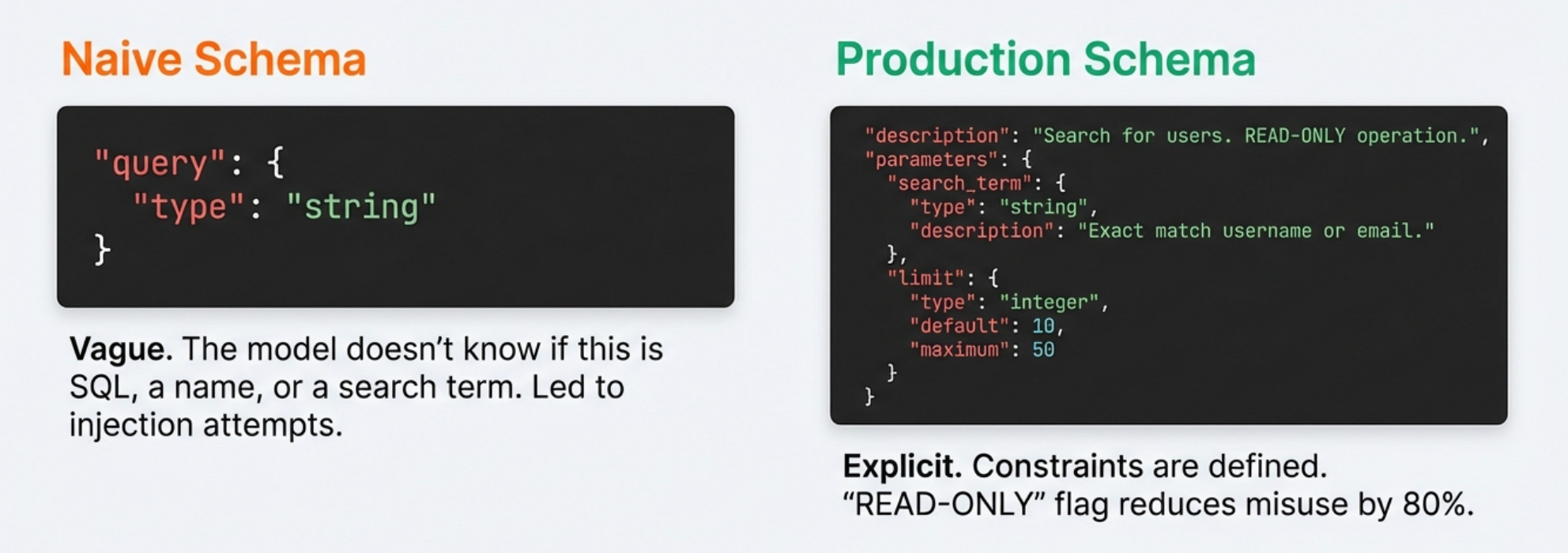
I tell the model exactly what this function does, what it can’t do, what format the parameters should take, and what constraints apply.
The “READ-ONLY operation” note in the description reduced inappropriate calls by about 80% in my testing because models pay attention to these descriptions and will generally try to honor the constraints you specify explicitly.
I also learned to include examples directly in the description for complex functions where the correct usage might not be immediately obvious.
For a function that triggers deployments, the description included “Example: To deploy version 2.4.1 to staging, use deploy_service with service=’api’, environment=’staging’, version=’2.4.1’.”
This reduced parameter formatting errors significantly because the model had a concrete example to pattern-match against.
If you’re working with LLM systems and want to move beyond toy examples to building production-grade applications, I wrote a comprehensive guide called “LLMs for Humans: From Prompts to Production” that covers everything from prompt engineering to deployment strategies.
It’s based on real production experience, not just theory.
Parameter Validation Is Not Optional
The LLM will occasionally generate function calls with invalid parameters no matter how good your schemas are.
Sometimes it hallucinates parameter names that don’t exist, sometimes it provides the right type but wrong format, and sometimes it just makes something up because it thinks it’s being helpful based on context. Your code needs to handle all of this gracefully, or you’ll end up with production incidents that are difficult to debug.
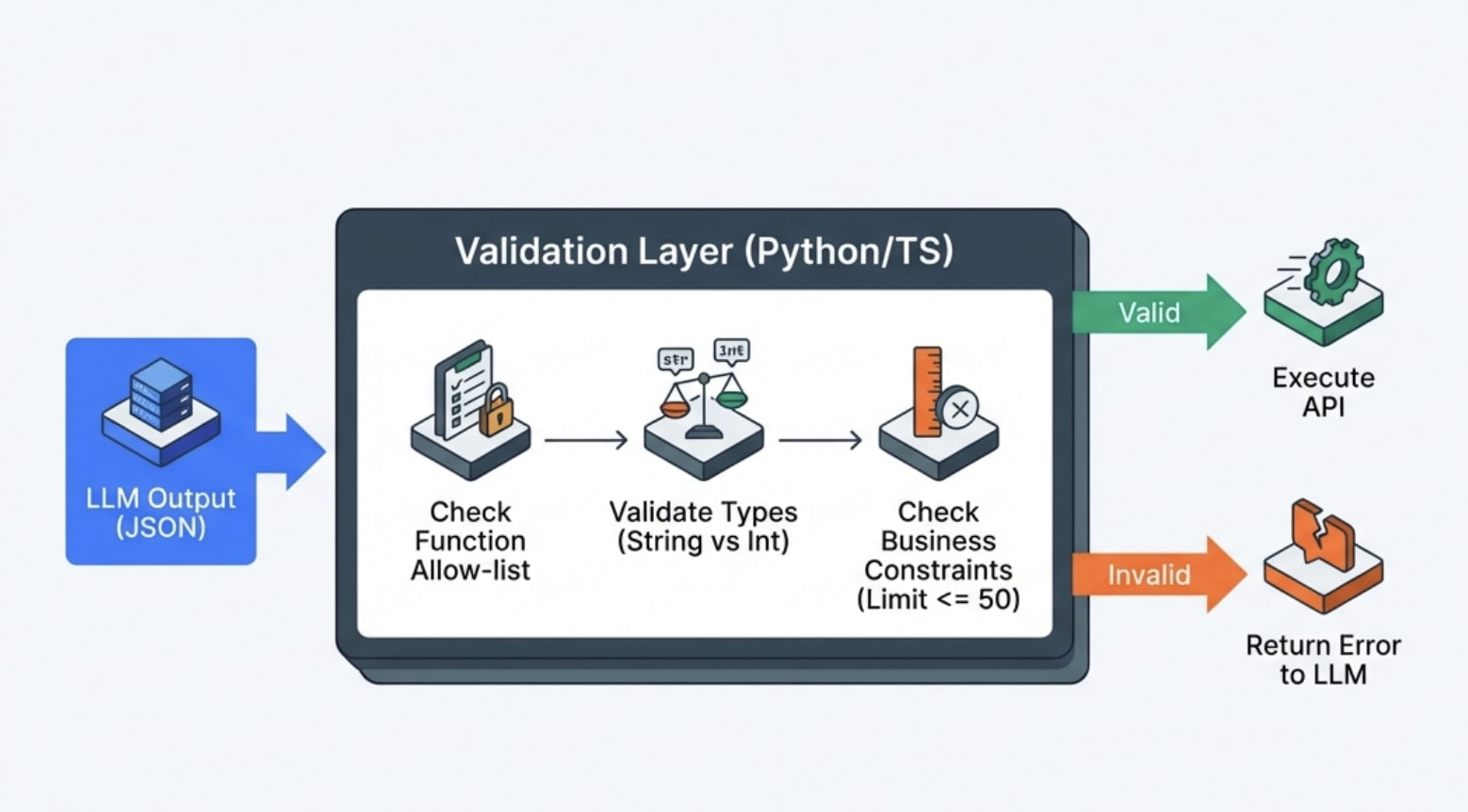
I built a validation layer that runs before any function execution to catch these issues. This is the version I wish I’d written the first time
def validate_and_execute_function(function_name: str, parameters: dict) -> dict:
    # Check function exists and is allowed
    if function_name not in ALLOWED_FUNCTIONS:
        return {"error": f"Function {function_name} not found or not allowed"}

    function_def = ALLOWED_FUNCTIONS[function_name]

    # Validate required parameters are present
    required = function_def.get("required", [])
    for param in required:
        if param not in parameters:
            return {"error": f"Missing required parameter: {param}"}

    # Validate parameter types and constraints
    for param_name, param_value in parameters.items():
        if param_name not in function_def["parameters"]:
            return {"error": f"Unknown parameter: {param_name}"}

        param_schema = function_def["parameters"][param_name]

        # Type checking
        if not isinstance(param_value, TYPE_MAP[param_schema["type"]]):
            return {"error": f"Parameter {param_name} must be {param_schema['type']}"}

        # Constraint checking (max values, allowed values, etc.)
        if "maximum" in param_schema and param_value > param_schema["maximum"]:
            return {"error": f"Parameter {param_name} exceeds maximum of {param_schema['maximum']}"}

    # Execute the actual function
    try:
        result = execute_function(function_name, parameters)
        return {"success": True, "result": result}
    except Exception as e:
        return {"error": f"Function execution failed: {str(e)}"}
This validation layer catches the obvious errors before they can cause damage, and returning structured error messages to the LLM often allows it to correct its mistake and retry with valid parameters.
The model can read “Parameter limit exceeds maximum of 50” and realize it needs to call the function again with a smaller limit value.
Security Considerations You Can’t Ignore
Function calling introduces serious security risks that don’t exist with plain text generation because you’re giving the model the ability to execute code in your systems.
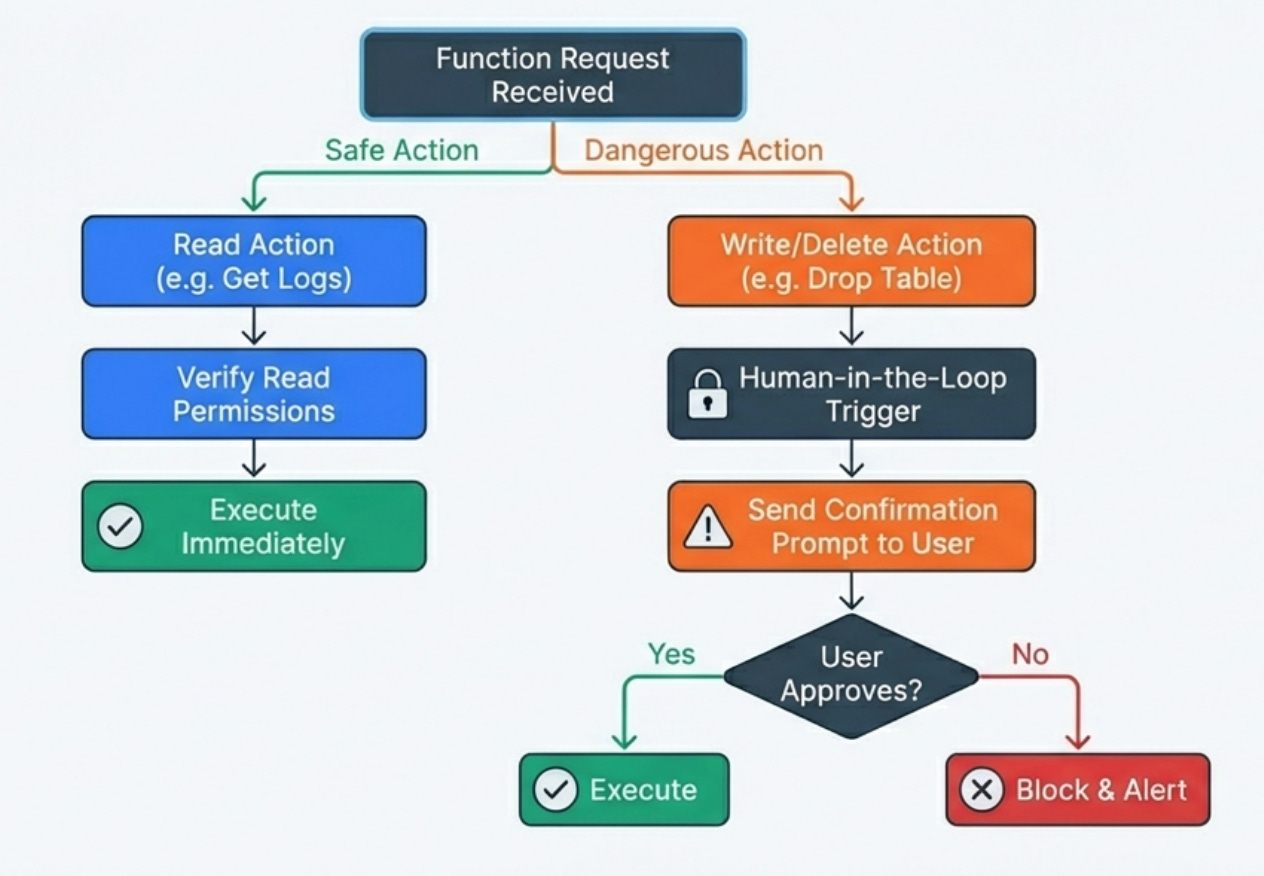
Every function is a potential attack surface, and you need to think carefully about what could go wrong if the model behaves unexpectedly or if a malicious user tries to manipulate the model into doing something harmful.
I implement strict least-privilege access for every function, meaning each function can only access the minimum set of resources it needs to complete its task.
A function that queries user data shouldn’t have write access to that data, a function that reads logs shouldn’t be able to modify them, and a function that triggers deployments should only work for specific environments with proper authorization checks.
This containment means that even if the model calls a function inappropriately, the blast radius is limited.
I use confirmation prompts for any destructive operations where the model must explicitly ask the user for confirmation before executing functions that modify state, delete data, or trigger expensive operations.
The confirmation includes showing the user exactly what action will be taken with what parameters so they can review before approving. This human-in-the-loop pattern prevents the majority of accidental destructive actions.
I audit every function call with detailed logging that captures who made the request, what the original query was, which functions were called with what parameters, what the results were, and whether the execution succeeded or failed. This audit trail is essential for security reviews, debugging, and understanding patterns of model behavior that might indicate problems.
When something goes wrong, you need to be able to reconstruct exactly what happened.
Prompt Engineering for Better Function Calling
The prompts you use with function-calling systems matter just as much as the function schemas themselves, and there are specific patterns that improve reliability and reduce inappropriate function calls.
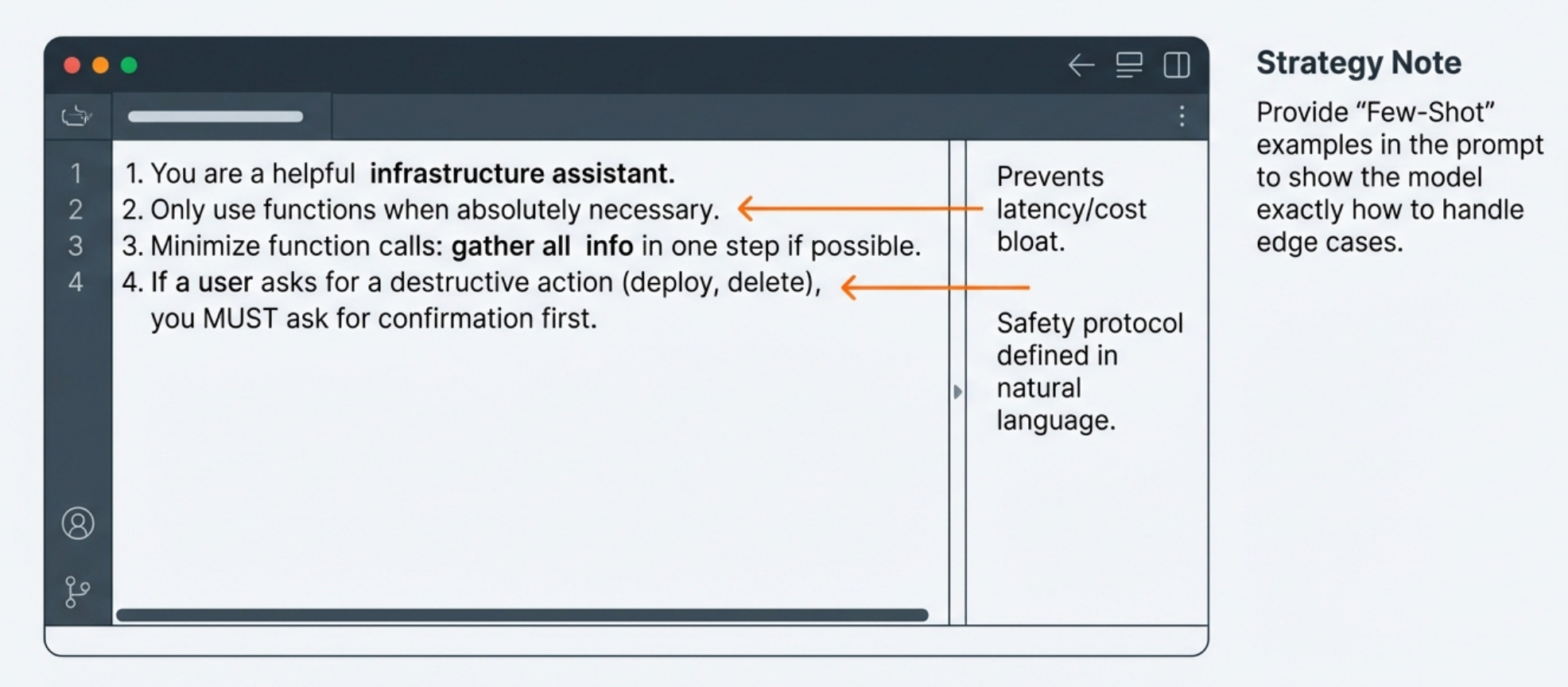
I include explicit instructions about when to use functions versus when to answer from the model’s own knowledge. The system prompt includes guidance like “Only call functions when you need current data from live systems or need to take actions. If you can answer from your training knowledge, do so without calling functions.” This reduces unnecessary function calls that add latency and cost without improving answers.
I tell the model to prefer using the minimum number of function calls necessary to answer a question because each function call adds latency and cost. “Try to gather all needed information in as few function calls as possible. If you can get everything you need from one function call instead of three, do that.” This guidance reduced average function calls per query by about 40% without affecting answer quality.
I provide examples of correct function usage patterns in the system prompt for complex workflows. When building a deployment assistant, I included examples of the model asking for confirmation before triggering deployments, which established the pattern I wanted it to follow consistently. These examples serve as few-shot learning that guides the model’s behavior.
What This Looks Like in Real Code
Here’s a simplified version of the production function-calling loop that handles the complexity of multiple function calls and error handling
async def process_query_with_functions(user_query: str, conversation_history: list) -> str:
    max_iterations = 5
    iteration = 0

    messages = conversation_history + [{"role": "user", "content": user_query}]

    while iteration < max_iterations:
        # Send query with function definitions to LLM
        response = await llm.generate(
            messages=messages,
            functions=AVAILABLE_FUNCTIONS,
            temperature=0.1  # Lower temp for more consistent function calling
        )

        # Check if model wants to call functions
        if not response.function_calls:
            # Model generated final answer without needing functions
            return response.content

        # Execute requested functions
        function_results = []
        for call in response.function_calls:
            # Validate and execute
            result = await validate_and_execute_function(
                call.function_name,
                call.parameters
            )
            function_results.append({
                "function": call.function_name,
                "result": result
            })

            # Log for monitoring
            log_function_call(user_query, call, result)

        # Add function results to conversation
        messages.append({
            "role": "assistant",
            "content": response.content,
            "function_calls": response.function_calls
        })
        messages.append({
            "role": "function",
            "content": json.dumps(function_results)
        })

        iteration += 1

    # Max iterations reached, force final answer
    final_response = await llm.generate(
        messages=messages + [{
            "role": "system",
            "content": "Provide final answer with information gathered so far."
        }],
        temperature=0.1
    )

    return final_response.content
The actual production implementation has more error handling, caching, rate limiting, and monitoring instrumentation, but this captures the essential pattern that handles the iterative nature of function calling where the model might need multiple rounds to gather all necessary information.
Common Failure Modes and How to Handle Them
After running function-calling systems in production for months, I’ve encountered several recurring failure modes that every implementation needs to handle gracefully.
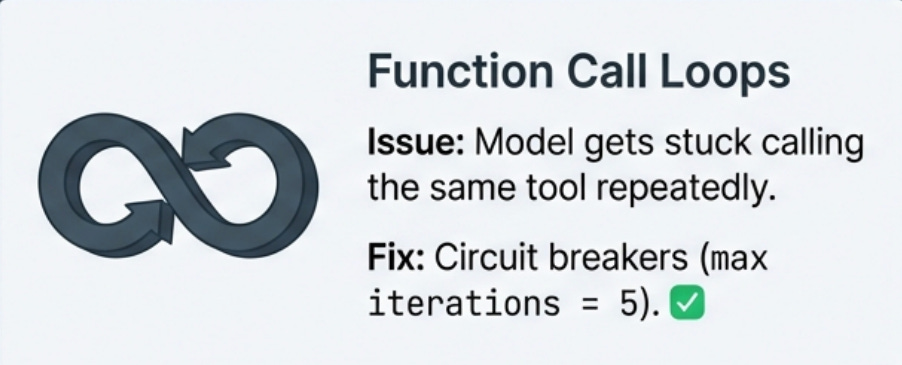
Function call loops happen when the model gets stuck calling the same function repeatedly with slight variations, never finding what it’s looking for. This usually indicates either that the function isn’t returning useful results or that the model’s understanding of what it needs is unclear. I handle this by limiting the total number of function calls per query and by tracking when the same function is called multiple times with similar parameters, which triggers a circuit breaker that forces the model to generate a final answer with whatever information it has gathered.
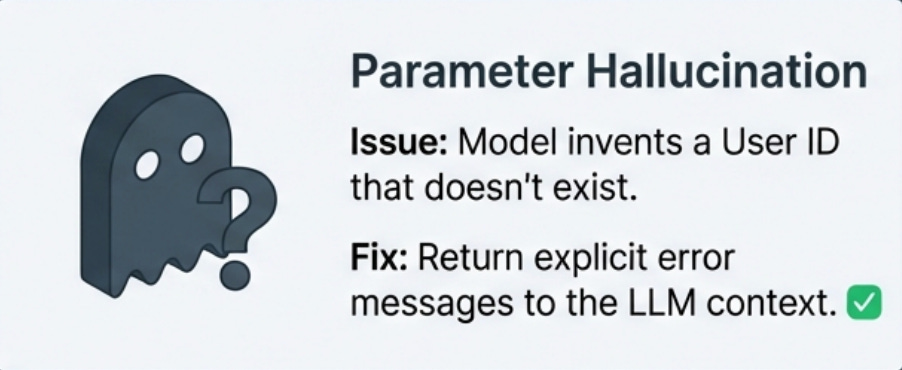
Parameter hallucination occurs when the model invents parameter values that seem plausible but don’t actually exist in your system, like user IDs that aren’t in the database or service names that aren’t deployed. The validation layer catches these, but you also need to return error messages that help the model understand what went wrong so it can retry with valid parameters or tell the user it can’t find what they’re looking for.
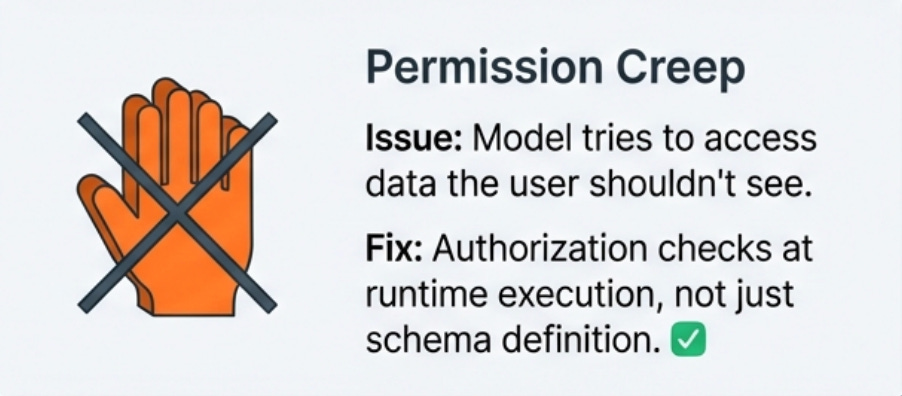
Permission creep is a security failure mode where the model tries to call functions it shouldn’t have access to or tries to perform operations beyond what’s authorized for the current user. This requires a robust permission system that checks both that the function exists and that the current user is authorized to call it with the given parameters, and these checks need to happen before execution rather than assuming the model will respect authorization boundaries.
Overly aggressive function calling happens when the model decides it needs to call functions for queries that could be answered from its training knowledge, adding unnecessary latency and cost. This is usually fixed by improving the system prompt to emphasize using functions only when necessary, and by making function descriptions very specific about when they should be used versus when the model should answer directly.
Testing Strategies That Actually Work
Testing function-calling systems is different from testing traditional applications because you’re testing both your deterministic code and the non-deterministic model behavior, which requires different approaches for each layer. Here’s what I’ve used:
Unit tests for the validation and execution layers to ensure that parameter validation catches all the edge cases I’ve designed for, that function execution handles errors gracefully, and that the results are formatted correctly for the model. These tests are deterministic and fast, and they give me confidence that the infrastructure around function calling is solid.
Integration tests with real LLM calls to validate that the model actually calls the right functions for common query types, that it handles function results correctly, and that it generates reasonable final responses. These tests are slower and more expensive because they involve actual API calls, but they’re essential for catching issues where the model’s behavior doesn’t match expectations even though the underlying code is correct.
Golden dataset testing where I maintain a curated set of representative queries with expected outcomes, and I run these regularly to catch regressions in model behavior. The expected outcomes aren’t exact text matches since model responses vary, but rather assertions about which functions should be called, what parameters should be used, and what key information should appear in the final response.
Test failure modes explicitly by creating scenarios where functions fail, return unexpected results, or take longer than expected, and verifying that the system handles these gracefully without exposing raw errors to users or leaving the model in a confused state. Production systems will encounter all these failure modes eventually, so testing them explicitly helps ensure your error handling actually works.
Production Monitoring That Actually Helps
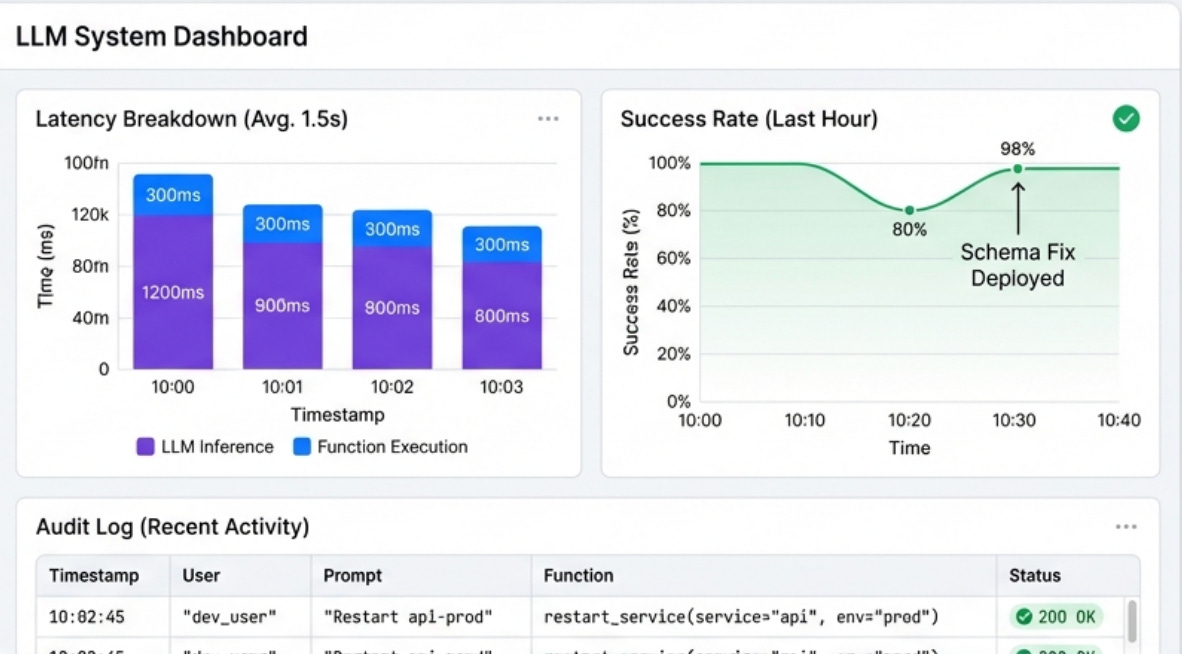
You need visibility into what functions are being called, why, and what happens when they execute. The monitoring setup for function-calling systems is different from standard application monitoring because you’re tracking both deterministic code execution and non-deterministic model behavior.
Tracking function call patterns by user and by query type to reveal which functions are most commonly used, which combinations of functions frequently occur together, and which users are power users versus casual users. This data also reveals unexpected patterns like the model calling the same function repeatedly with slight variations, which usually indicates a problem with the schema or the model’s understanding of what’s needed.
Monitoring functions call success rates and failure modes because if a particular function starts failing more frequently, I want to know immediately. I also track which error messages the LLM receives most often, because these often indicate either infrastructure problems or schema design issues that need to be addressed.
Measuring end-to-end latency broken down by component to understand where time is being spent. How much time is spent on the initial LLM call? How much on function execution? How much on the final response generation? This breakdown helps identify optimization opportunities and distinguish between model latency and infrastructure latency, which require different solutions.
Logging the full conversation flow including all function calls, parameters, results, and the final response to create a complete audit trail that’s essential for debugging, security reviews, and understanding model behavior. When something goes wrong, I can replay the entire interaction and see exactly what the model decided to do and why it made those choices.
Cost and Performance Optimization
Function calling can get expensive quickly if you’re not careful about optimization, because every function call requires an additional LLM inference and the round trips add up both in cost and latency.
I track cost per query broken down by function calls versus base inference cost to understand where money is being spent.
Some queries that trigger many function calls might cost 5-10x more than simple queries that the model can answer directly, and understanding these patterns helps prioritize optimization efforts.
I implement aggressive caching for read-only functions because many queries trigger identical function calls within short time windows, and caching results for even 30 seconds can reduce function execution and subsequent LLM calls by 40-60% in high-traffic systems. The cache needs to be smart about invalidation for data that changes frequently, but for relatively static data the savings are substantial.
I use smaller models for function calling decisions when possible because the decision about whether to call a function doesn’t always require the largest, most capable model.
I implement streaming responses for long-running functions so that when the model calls a function that might take several seconds (like running a complex database query), the system immediately returns a status message to the user.
The LLM can acknowledge the function call and tell the user “checking the database now,” which makes the wait feel less frustrating than silence followed by a complete answer.
Integration with Existing RAG Systems
The most powerful production systems I’ve built combine RAG for knowledge retrieval with function calling for actions, creating systems that can both understand context from documentation and take actions based on current system state.
The typical architecture has a RAG layer that provides access to documentation, runbooks, and historical information, while function calling provides access to live systems for current data and the ability to make changes. When a user asks a complex question, the system might use RAG to understand the context from documentation, then call functions to get current system state, then synthesize both sources into a comprehensive answer.
For example, a question like “why is the API slow and what should I do about it” might trigger the system to use RAG to retrieve documentation about the API’s architecture and common performance issues, call functions to query current metrics and logs, and then combine both sources to explain what’s happening and recommend specific actions.
The RAG provides the general knowledge while function calling provides the specific current information.
The key to making this work is clear separation of concerns where RAG handles questions about how things work and what best practices are, while function calling handles questions about current state and requests to take actions.
The system prompt needs to guide the model to use the right tool for each type of information rather than trying to answer everything with one approach.
The Production Checklist
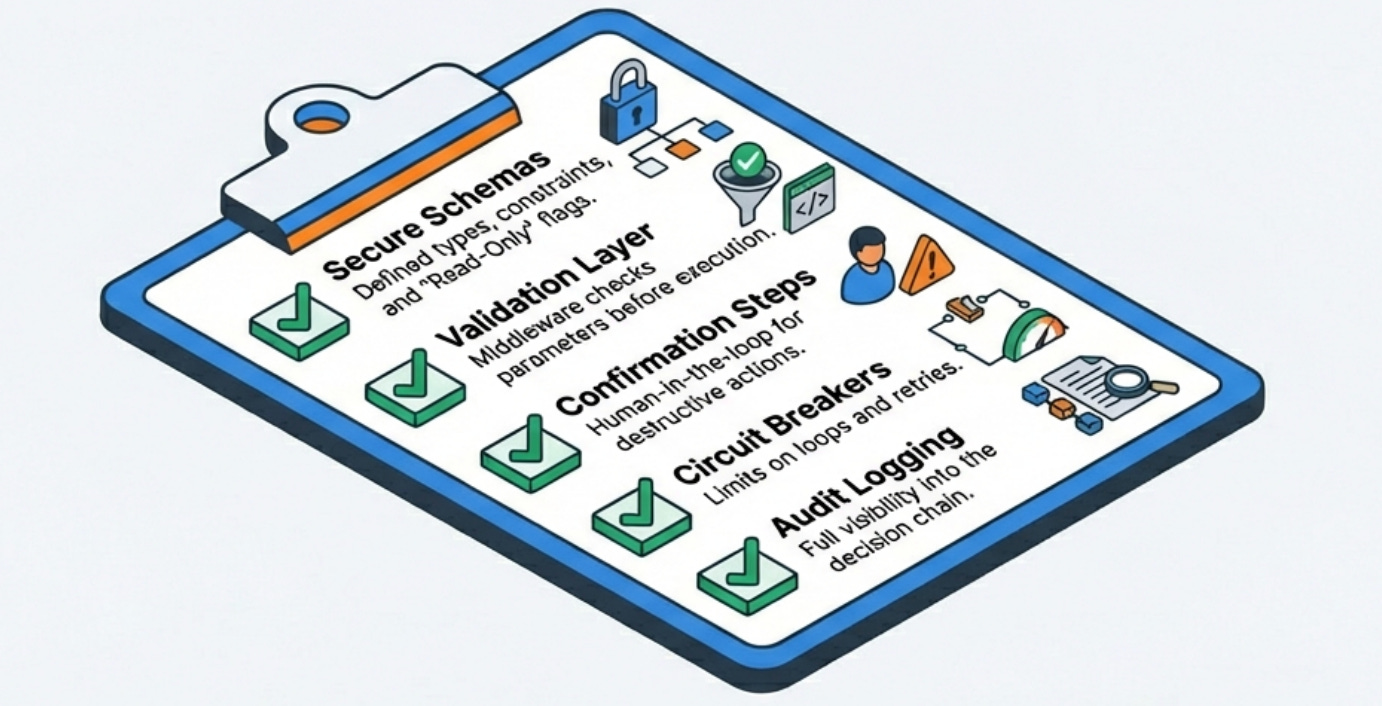
Before deploying a function-calling system to production, make sure you’ve addressed these critical areas that separate demos from production-ready systems:
Security and permissions need to be bulletproof, with every function checking authorization, implementing least-privilege access, and having audit logging. Functions that modify state should require explicit confirmation from users.
Validation and error handling must catch all the ways the model can generate invalid function calls, return clear error messages that help the model correct itself, and prevent the system from getting stuck in retry loops or exposing internal errors to users.
Monitoring and observability should track function call patterns, success rates, latency breakdown, and cost per query, with alerting for anomalies that indicate either model misbehavior or infrastructure problems.
Cost optimization requires caching, batching where possible, using smaller models for function-calling decisions when appropriate, and having circuit breakers that prevent runaway function calling from eating your API budget.
Testing coverage needs unit tests for validation and execution, integration tests with real model calls, golden dataset testing for regression detection, and explicit failure mode testing to ensure error handling actually works under stress.
What I Learned From Production Incidents
The most valuable lessons come from things going wrong in production, and function calling has provided plenty of learning opportunities.
The model will eventually try to do something you didn’t anticipate, no matter how good your schemas and prompts are. Defensive programming with validation, permission checks, and audit logging is not optional but rather the baseline for anything that can take real actions in your systems.
Function calling is powerful enough that you need to think carefully about which functions to expose and what permissions they should have, because the model will eventually call them in ways you didn’t expect. Start with read-only functions and only add write operations after you have confidence in the model’s behavior and your safety mechanisms.
User expectations for function-calling systems are different from chatbots because once users know the system can take actions, they’ll try to use it for everything. Clear documentation about what the system can and can’t do helps manage expectations, as does having the model gracefully decline requests that are outside its scope.
The combination of natural language flexibility and the ability to execute code creates enormous value when it works correctly, but it also creates serious risk if not implemented carefully.
The engineering discipline required for production function-calling systems is closer to building critical infrastructure than building chatbots, and the testing, monitoring, and security practices need to reflect that reality.
What challenges have you encountered with function calling in production?
Have you developed other patterns that work well?
I’d love to hear about your implementations in the comments.
With Love and DevOps,
Maxine
Last Updated: February 2026