
Architecture Patterns
Visual guides to foundational DevOps and platform engineering patterns. Each diagram breaks down complex systems into clear, understandable flows with real-world context on when to use them.
🏗️ Ready to Build your Career in Tech?
If you’re new to the cloud space and want:
Hands-on projects with solutions and a structured curriculum that connects these concepts, I built The DevOps Career Switch Blueprint just for you. ❤️
Disaster Recovery: Before & After Architecture
The Problem: Most DR plans fail because backups live in the same account as production, use single-region strategies, and have no automated validation. When disaster strikes, you discover your backup strategy has critical gaps.
The Solution: This architecture shows the evolution from a fragile single-account backup approach to a resilient multi-account, multi-region DR system with automated validation and audit evidence.
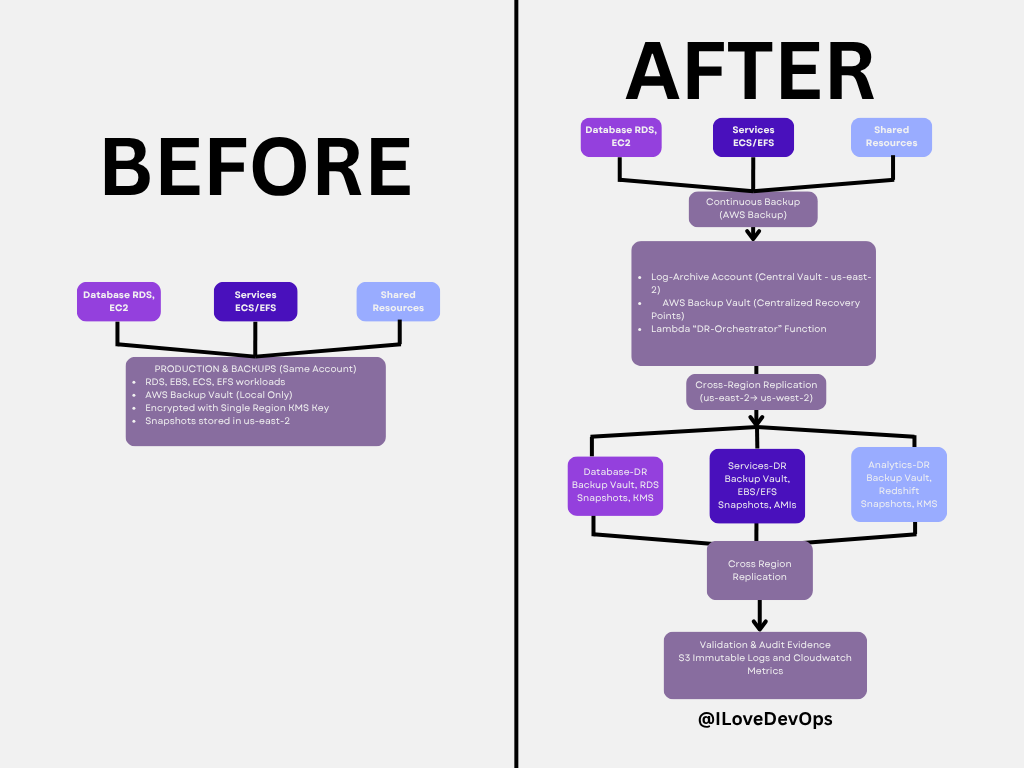
Key improvements in the “After” architecture:
Centralized backup vault in dedicated log-archive account (us-east-2)
Cross-region replication for geographic resilience (us-east-2 → us-west-2)
Automated validation via Lambda DR-Orchestrator function
Immutable audit logs in S3 with Object Lock
Separate DR accounts with pilot light infrastructure ready to scale
When to use this pattern:
Enterprise environments with compliance requirements (SOC 2, ISO 27001)
Multi-account AWS Organizations managing 10+ accounts
Systems with strict RTO/RPO requirements (< 1 hour recovery)
Scenarios where audit evidence must be automatically generated
Implementation considerations:
AWS Backup with cross-account, cross-region copy policies
Lambda functions for automated testing and validation
Transit Gateway for network connectivity in DR region
IAM roles for cross-account snapshot access
CloudWatch metrics and alarms for validation failures
Read the full guide: The Disaster Recovery Playbook That Actually Works
Disaster Recovery: Production to DR Flow
Deep dive: This diagram shows the detailed flow of how production workloads in us-east-2 replicate to DR infrastructure in us-west-2, including the validation and audit evidence collection that makes this architecture compliant and trustworthy.
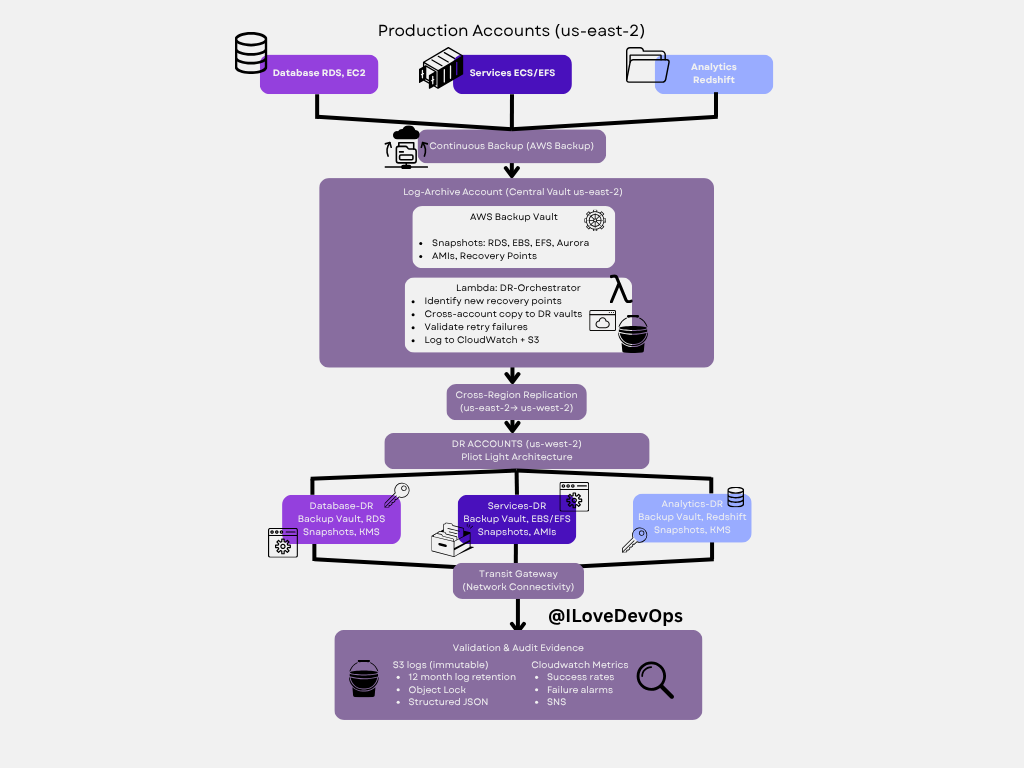
Architecture layers:
Production Account (us-east-2):
Database RDS/EC2 with continuous AWS Backup
Services ECS/EFS with automated snapshots
Analytics (Redshift) with backup retention
Log-Archive Account (Central Vault):
AWS Backup Vault stores all recovery points
Lambda DR-Orchestrator runs automated validation
Cross-account copy to DR vaults
Logs to CloudWatch and immutable S3 storage
DR Accounts (us-west-2) - Pilot Light:
Mirror structure of production (Database-DR, Services-DR, Analytics-DR)
Backup vaults with replicated snapshots and AMIs
Transit Gateway for network connectivity
Ready to scale from pilot light to full capacity
Validation & Audit Evidence:
S3 logs with 12-month retention and Object Lock
CloudWatch metrics showing success rates and failure alarms
Structured JSON for automated compliance reporting
SNS notifications for validation failures
Cost profile: ~$300-400/month for backup storage, cross-region copy, and Lambda execution. Compare this to the cost of a 4-hour production outage.
Common pitfalls avoided:
KMS key policies aligned across accounts (prevents snapshot copy failures)
IAM role trust chains centralized in Terraform (no manual drift)
Automated testing prevents “backup exists but can’t restore” scenarios
Immutable logs satisfy SOC 2 audit requirements automatically
GitOps-Driven Infrastructure
Deep Dive: GitOps has been battle-tested since 2017 as a foundational pattern for managing infrastructure at scale. The core principle: Git becomes your system’s control plane. Every change, whether infrastructure or application, flows through versioned commits that trigger automated reconciliation via tools like ArgoCD. Your infrastructure becomes declarative, auditable, and self-healing.
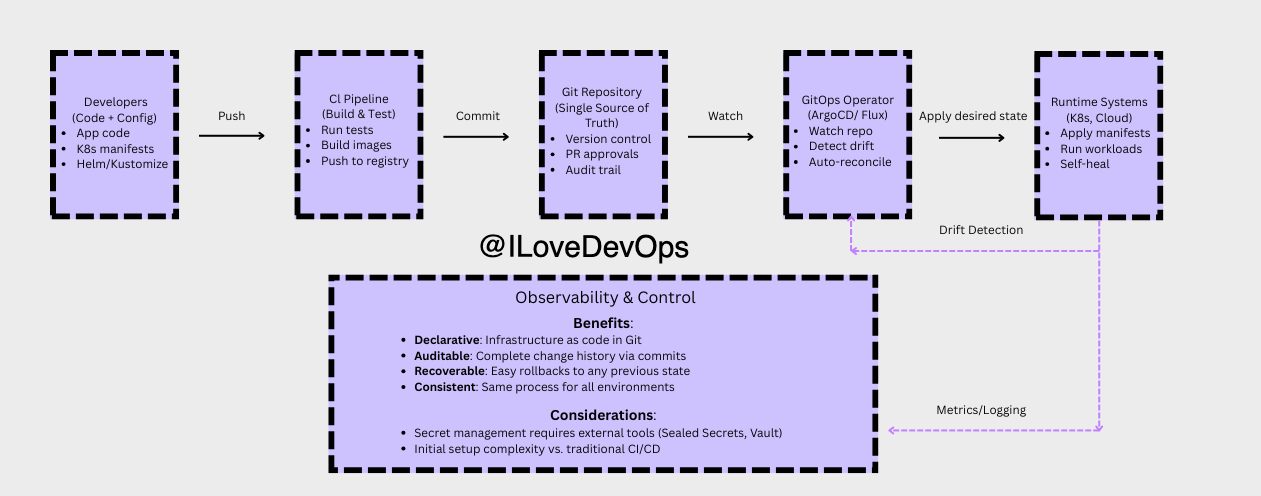
The pattern naturally separates:
Immutable layers - Infrastructure, base templates, network topology
Mutable layers - Application configs, feature flags, scaling parameters
Key insight: Traditional CI/CD pushes changes to your infrastructure. GitOps pulls from a source of truth. Your cluster recovers itself after failures, unauthorized changes get reverted automatically, and every change has an audit trail by default.
When to use GitOps:
Managing Kubernetes clusters at scale
Teams with strict compliance requirements
Multi-environment deployments (dev/staging/prod)
Infrastructure requiring strong audit trails
When to skip GitOps:
Very small teams (< 5 engineers) with simple infrastructure
Rapid prototyping phases where structure slows down exploration
Legacy systems that can’t adopt declarative configuration
For teams managing multiple environments or compliance requirements, GitOps eliminates entire classes of operational problems. It explains itself through Git history and scales without chaos.
Multi-AZ High Availability Web Application
Deep dive: This is the foundational pattern for production-grade web applications on AWS. It demonstrates how to achieve both high availability and automatic scaling across multiple Availability Zones using Terraform as your infrastructure-as-code tool. The architecture survived the 2017 us-east-1 outage that took down single-AZ deployments across the internet, multi-AZ designs kept running.
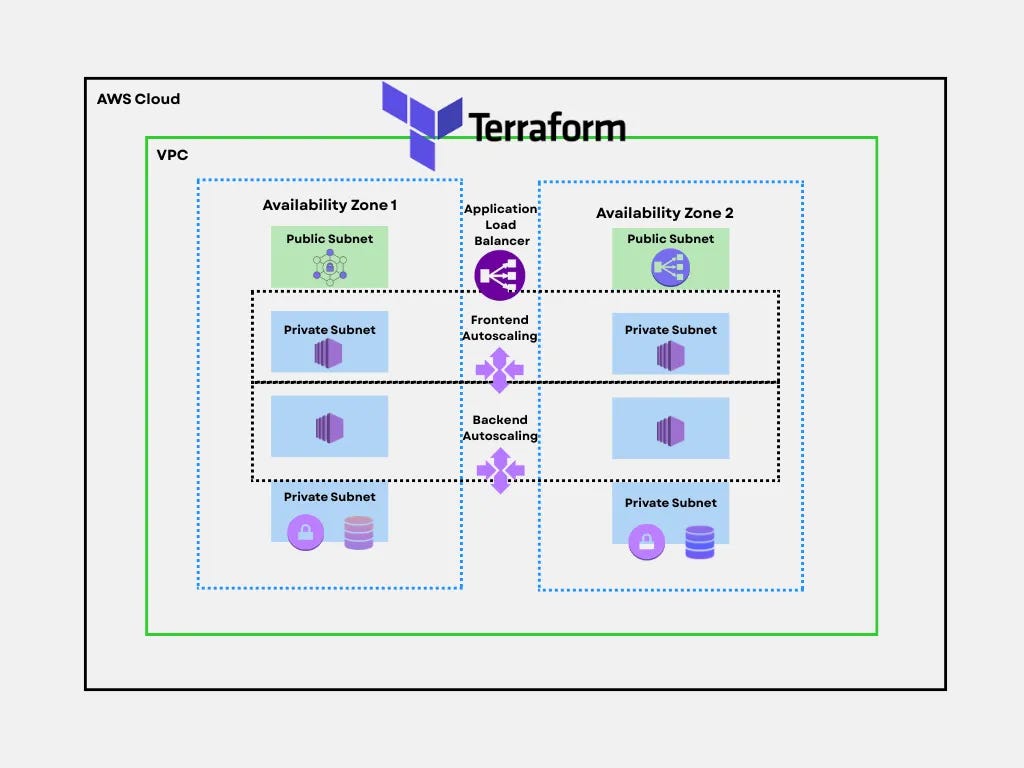
Architecture layers:
Load Balancing & Traffic Distribution:
Application Load Balancer spans both AZs, performing health checks every 30 seconds
Automatically routes traffic away from unhealthy instances
Handles SSL/TLS termination at the edge
Public Subnets (both AZs):
NAT Gateways for outbound internet access from private subnets
Bastion hosts or Session Manager endpoints for administrative access
Only internet-facing components live here
Private Subnet Tier 1 - Frontend Autoscaling:
Web servers (EC2 instances) running nginx, Apache, or application servers
Autoscaling policies trigger on CPU, memory, or request count
Minimum 2 instances (one per AZ) for redundancy
Scale from 2→20 instances during traffic spikes
Private Subnet Tier 2 - Backend Autoscaling:
Application logic, API servers, microservices
Isolated from direct internet access for security
Can scale independently from frontend tier
Communicates with frontend via internal load balancers
Private Subnet Tier 3 - Database Layer:
RDS Multi-AZ deployment with automatic failover
Primary database in AZ1, synchronous replica in AZ2
Failover completes in 60-120 seconds with no data loss
Read replicas can be added for read-heavy workloads
When to use this pattern:
Production applications requiring >99.9% uptime
Workloads with variable traffic (autoscaling reduces costs during low periods)
Applications where a single AZ failure can’t be tolerated
Teams practicing infrastructure-as-code with Terraform
When to skip this pattern:
Development/staging environments (single-AZ is cheaper)
Applications with <100 users where downtime is acceptable
Prototypes where speed matters more than reliability
Batch processing jobs that can retry failures
Cost profile: ~$500-800/month minimum for small production workload (t3.small instances, db.t3.small RDS, ALB). Autoscaling means you pay for actual usage rather than peak capacity 24/7. Multi-AZ RDS roughly doubles database costs but includes automatic backups and failover.
Common pitfalls avoided:
Cross-AZ data transfer costs: Keep chatty services in the same AZ when possible. The load balancer distributes requests, but backend-to-database calls should minimize cross-AZ hops.
Autoscaling thrashing: Set minimum cooldown periods (300 seconds) to prevent constant scale-up/scale-down cycles.
Database connection exhaustion: Use connection pooling (PgBouncer, RDS Proxy) as instances scale horizontally.
Terraform state locking: Store state in S3 with DynamoDB locking to prevent concurrent modification corruption.
Security group sprawl: Define clear rules for each tier, frontend accepts 80/443 from ALB, backend accepts traffic only from frontend, database accepts traffic only from backend.
The reliability difference: Single-AZ deployments see 99.5% availability (3.5 days downtime/year). Multi-AZ architectures achieve 99.95%+ (4 hours downtime/year). For revenue-generating applications, this pattern pays for itself after the first prevented outage.
More architecture patterns coming soon!