
DNS: The Infrastructure Layer You Ignore Until It Takes Down Everything
A practical guide to understanding DNS in production systems, from records and resolvers to propagation delays, outages, and the hidden infrastructure dependencies most engineers overlook.


You type a domain name, the browser finds the server, the page loads.
Fast lookups. Happy users. Zero confusion about what connects where.
That’s the promise of DNS. Ta-da. 🎉
I’ve watched a single misconfigured TTL cascade into a four-hour outage that affected three continents. The application code was perfect, the servers were healthy, and every health check passed. But nobody could reach us because DNS was quietly serving stale records pointing to infrastructure we’d decommissioned two weeks earlier.
The thing about DNS is that it works so well, so invisibly, that most engineers treat it like plumbing. Set it and forget it. Until you’re staring at a support ticket that says “site is down” while your dashboards show every service running green.
In order for that to happen, let’s understand what’s happening under the hood so that when it breaks, and it will break, you know where to look.
Hi I’m Maxine, a cloud infrastructure engineer who spends my days scaling databases, debugging production incidents, and writing about what actually works in production.
You can get a copy of my LLMs for Humans: From Prompts to Production (at 30% off right now) ←
Or for free when you become a paid subscriber.
It’s 20 chapters of practical applied AI with real production context, not theory. And it’ll help you get smarter about using AI tools in infrastructure workflows.

Checkout my work:
Plus, if you’re thinking about making a career move into cloud or DevOps and want a structured path to get there, get a copy of my The DevOps Career Switch Blueprint.
Okay, let’s get into it
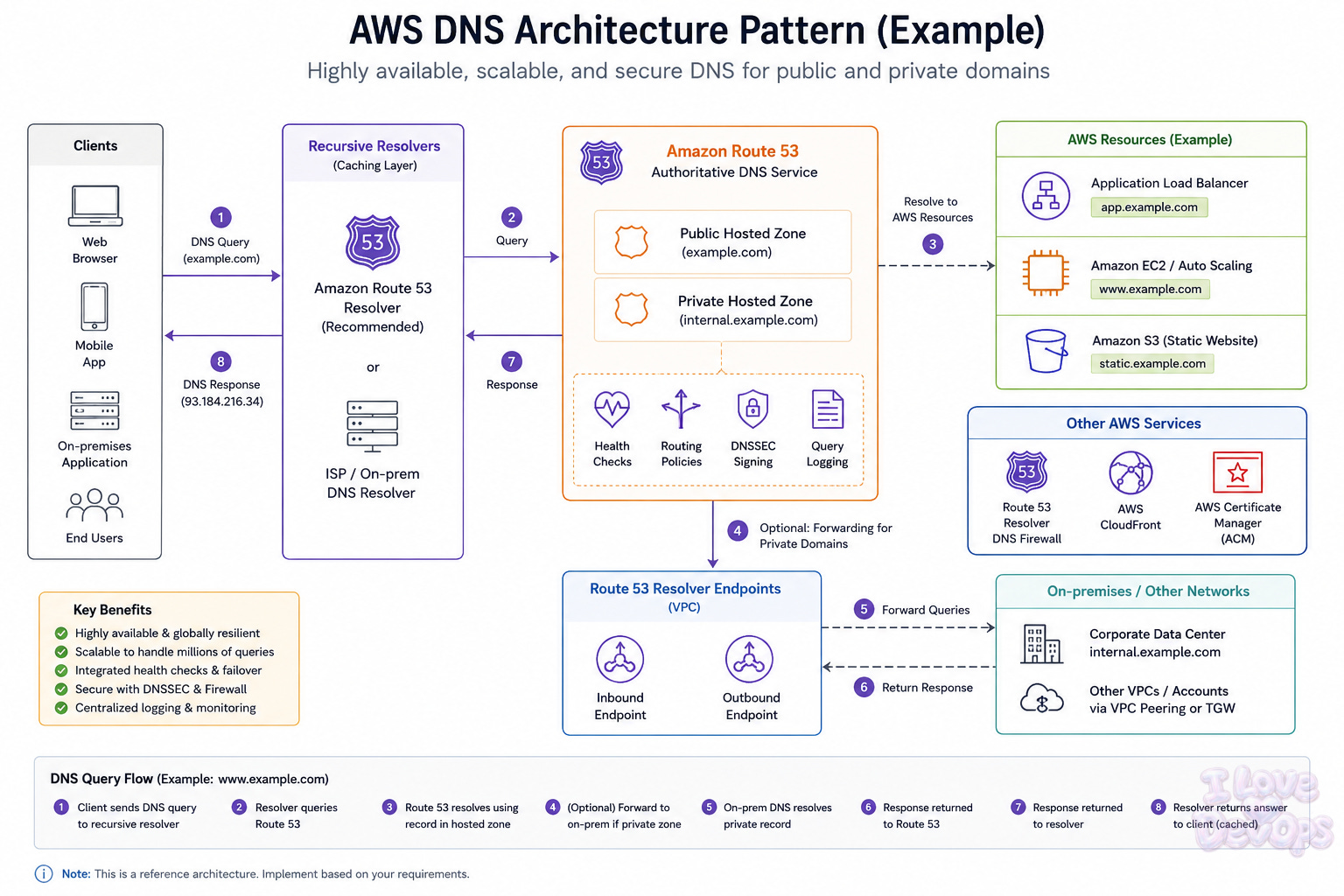
The Actual Architecture
DNS looks simple from the outside. Query goes out, answer comes back. But the resolution path involves more moving pieces than most engineers realize, and each one is a potential failure point.
The stub resolver
This is the DNS client on your local machine or application. It doesn’t do any recursive resolution itself. It just asks someone else.
When your browser needs to resolve api.yourcompany.com, the stub resolver checks its local cache first, then forwards the query to whatever nameserver is configured in /etc/resolv.conf or your DHCP settings.
nameserver 10.0.0.2
nameserver 10.0.0.3
options timeout:2 attempts:3
Those options matter more than most people think. A two-second timeout with three attempts means you’re waiting six seconds before giving up on a nameserver. In production, that’s an eternity.
The recursive resolver
This is the workhorse. When your stub resolver asks a question, the recursive resolver does the actual work of chasing down the answer.
The resolution path for api.yourcompany.com:
Query root servers → Get referral to .com TLD servers → Query .com servers → Get referral to yourcompany.com nameservers → Query authoritative nameservers → Get the actual answer
That’s four to five network round trips for a cold cache lookup. In practice, most of these are cached, so typical resolution happens in one hop. But when caches expire or when you’re querying something new, you pay the full price.
Authoritative nameservers
These are the source of truth for your domain. When a recursive resolver reaches the end of the referral chain, it’s asking your authoritative nameservers what the actual record value is.
You either host these yourself, delegate to your registrar, or use a managed DNS provider like Route53, Cloudflare, or NS1. Most production environments use managed providers.
Smart choice. Running authoritative nameservers yourself means maintaining infrastructure that needs to be globally distributed, DDoS-resistant, and available when everything else is on fire.
Caching layers
Every step in this chain caches aggressively.
Your browser caches.
Your operating system caches.
The recursive resolver caches.
Sometimes your application framework caches.
Each cache has its own TTL interpretation, its own eviction policy, and its own idea of when “expired” actually means “stop using this.”
This is where things get interesting.
TTL: The Config Value That Lies to You
Time to live. The number that tells caches how long they can trust a record before asking again.
Except that’s not quite what happens.
TTLs are suggestions, not commands, so resolvers can ignore them. Browsers definitely ignore them. And most engineers set TTLs based on vibes rather than any actual understanding of their traffic patterns.
I’ve seen teams set TTLs to 86400 (one day) because “DNS doesn’t change often.” Then they do a migration and spend the next 24 hours watching traffic trickle over while stale caches continue sending requests to the old infrastructure.
On the other end, I’ve seen TTLs of 30 seconds on records that change maybe once a year. That’s a lot of unnecessary queries hammering your DNS provider, and it adds latency to every resolution.
The right TTL depends on how often you change things and how fast you need changes to propagate.
For static infrastructure: 3600 seconds (one hour) is reasonable.
For things that might need fast failover: 60 to 300 seconds.
For active migrations or blue-green deployments: drop to 60 seconds a day before you flip, then raise it back after.
One critical detail: TTL countdown starts when the recursive resolver caches the record, not when you query it. If a resolver cached your record 45 minutes ago with a 60-minute TTL, you’re getting that record for 15 more minutes regardless of what you change on the authoritative side.
What Production Actually Looks Like
In staging, DNS is simple. You have a few records, maybe some CNAMEs for convenience, and everything resolves through your cloud provider’s default resolver.
Production is different.
You’ve got internal DNS zones for service discovery. External zones for customer-facing domains. Split-horizon configurations where the same domain resolves differently depending on where the query originates. Health-checked records that route around failures. Weighted records for gradual traffic shifts.
And all of it needs to work when your network is having a bad day.
The split-horizon problem
If you’re running services that need to be reachable both internally and externally, you probably have split DNS. Internal queries for api.yourcompany.com resolve to private IPs. External queries get public IPs or load balancer addresses.
This works until someone’s laptop is on VPN and the resolver can’t figure out which zone to use. Or until your CI/CD pipeline runs from a cloud instance that’s technically “internal” but doesn’t have the private routes to reach internal IPs.
The fix is usually a dedicated internal domain like internal.yourcompany.com or corp.yourcompany.com that’s explicitly private. No ambiguity about resolution.
The health check gap
Route53 and Cloudflare both offer health-checked DNS. If an endpoint fails health checks, traffic routes to the healthy one.
Sounds great. But health check DNS has a dirty secret: the TTL still applies.
If your health check interval is 10 seconds and your TTL is 60 seconds, you could detect a failure in 10 seconds but clients won’t see the change for up to 60 more seconds. That’s a 70-second window where you know something is broken but users are still getting sent there.
Lower your TTLs on health-checked records. Accept the query volume hit. It’s worth it.
Failure Modes Nobody Documents
DNS failures are special because they look like everything else is broken. Users say “the site is down”, monitoring says everything is fine, the actual problem is invisible unless you know where to look.
1. NXDOMAIN surprise: Users report they can’t reach your site. Some users. In some regions. Intermittently.
One of your nameservers is returning NXDOMAIN (domain does not exist) while others return correct records. This happens when you have multiple authoritative nameservers and one of them didn’t get the zone update. Recursive resolvers round-robin between your nameservers, so some queries hit the broken one.
Try to query each of your authoritative nameservers directly to verify they’re all returning the same data. Use dig @ns1.yourprovider.com yourcompany.com for each nameserver in your NS record set. If one’s wrong, force a zone transfer or contact your provider.
2. The CNAME chain of death: Resolution is slow. Sometimes it times out. Performance is inconsistent.
You have CNAMEs pointing to CNAMEs pointing to CNAMEs. Each hop requires a separate resolution, and if any intermediate CNAME has a short TTL, you’re doing this resolution dance constantly. Some resolvers have limits on CNAME chain depth and will just give up.
Try flattening your CNAME chains. If you’re using app.yourcompany.com → app.yourcdn.com → d123.cloudfront.net → some A record, consider whether that middle hop is necessary. Most CDNs can handle the direct CNAME.
3. Resolver poisoning via cached negative responses: A domain that should exist returns NXDOMAIN even though you can see the correct records when querying authoritative servers directly.
Someone queried the domain before it existed (or while it was misconfigured), and the resolver cached the negative response. Negative caching is aggressive. The SOA record’s minimum TTL field controls how long NXDOMAIN gets cached, and it’s often set to an hour or more.
Try to wait for the negative cache to expire, or get users to use different resolvers temporarily. For future prevention, make sure your SOA minimum TTL is reasonable for your use case. If you’re doing rapid iteration, 300 seconds is better than 3600.
4. DNSSEC validation failures: Your domain works from some networks but returns SERVFAIL from others.
DNSSEC validation is failing. Either your zone’s signatures expired, your DS record at the parent doesn’t match your current DNSKEY, or something in the chain of trust is broken. Validating resolvers will refuse to return answers that fail validation.
Go ahead and check your DNSSEC configuration with a tool like dnsviz.net. If you didn’t intentionally set up DNSSEC, you probably have a leftover DS record from a previous provider that needs to be removed from your registrar.
The Terraform Parts That Fight Back
DNS in Terraform seems straightforward until you actually try to manage it at scale.
resource "aws_route53_record" "api" {
  zone_id = aws_route53_zone.main.zone_id
  name    = "api.yourcompany.com"
  type    = "A"
  ttl     = 300
  records = [aws_eip.api.public_ip]
}
Simple enough. But here’s where it gets complex.
The deletion timing problem
If you’re replacing infrastructure, Terraform wants to delete the old record before creating the new one. During that window, the record doesn’t exist. If any resolver happens to query during that moment, it caches NXDOMAIN.
The workaround is lifecycle rules:
resource "aws_route53_record" "api" {
  # ... same config ...

  lifecycle {
    create_before_destroy = true
  }
}
This creates the new record before destroying the old one. But it only works if the records don’t conflict. For A records with different values, you might need to use weighted routing with a temporary weight of 0 on the old record.
The zone delegation dance
If you’re managing zones across accounts or environments, you need NS record delegation. And the NS records for a subdomain need to exist in the parent zone before you can meaningfully use the child zone.
This creates a chicken-and-egg problem with Terraform. The child zone’s nameservers aren’t known until after it’s created. But you want to create everything in one apply.
The answer is usually splitting into two applies or using depends_on with separate Terraform runs. Not elegant, but it works. [INTERNAL LINK: terraform state management patterns] if you’re dealing with multi-account setups.
The alias record exception
Route53 alias records are special. They’re not real DNS records. They’re Route53’s internal pointer system, and they have different behavior around TTLs and billing.
resource "aws_route53_record" "api" {
  zone_id = aws_route53_zone.main.zone_id
  name    = "api.yourcompany.com"
  type    = "A"

  alias {
    name                   = aws_lb.api.dns_name
    zone_id                = aws_lb.api.zone_id
    evaluate_target_health = true
  }
}
Note there’s no TTL field, alias records inherit TTL from their target. You can’t control it directly. This is usually fine, but it means your propagation timing is now dependent on AWS’s internal TTL choices.
The Uncertainty I Can’t Resolve
I don’t have a definitive answer on the right DNS provider for every situation.
Route53 is deeply integrated with AWS and has first-class support for health checks against AWS resources. But it’s not the fastest for global resolution. Cloudflare has excellent edge performance and DDoS protection baked in. NS1 has sophisticated traffic management that’s genuinely impressive if you need it.
I’ve seen teams successfully run critical production on all three, but I’ve also seen teams have bad experiences with all three.
What I can tell you is that the provider matters less than your operational hygiene around it. Monitoring your resolution latency, having runbooks for common failures, testing changes before they hit production DNS. That’s what determines whether you have a good time or a bad time.
The other thing I’m genuinely uncertain about is DNSSEC in 2026. The security argument is real, cache poisoning attacks exist. But DNSSEC adds operational complexity, creates new failure modes, and the tooling support is still rough in some ecosystems.
What Happens When DNS Works
When DNS is working well, you don’t notice it at all, and as usual with infrastrucure, that’s the point.
But there are real, measurable benefits that show up in ways you might not expect:
Resolution latency drops because you’ve tuned TTLs appropriately instead of defaulting
Migrations become predictable because you understand propagation timing
Outage investigations get shorter because you know to check DNS early
Capacity planning improves because you can actually model how changes will propagate
The quietest win I ever had was at a company where I spent two weeks properly documenting our DNS architecture and setting up monitoring. For the next year, every time someone said “is the site down?” we could rule out DNS in thirty seconds instead of twenty minutes.
That doesn’t show up on any OKR. Nobody celebrates the absence of DNS problems. But it’s real time saved, real stress avoided, real incidents that didn’t escalate because someone knew where to look.
What’s your worst DNS war story? The one where resolution was the culprit and nobody suspected it until way too late? I’d love to hear about it in the comments.
With Love and DevOps,
Maxine

If you made it this far and you’re managing cloud infrastructure with Terraform, you might want to keep this one close too.
What Is Infrastructure as Code? A Beginner’s Guide to Terraform and Cloud Infrastructure
is where I start people who are new to IaC or who understand it conceptually but haven’t had to debug it in a real environment yet. It covers the mental model behind declarative infrastructure so that articles like this one make sense end to end, not just the code snippets.
And if you’re working with AI in your stack or trying to understand where LLMs actually fit in a production system without the hype, LLMs for Humans: From Prompts to Production is the guide I wish existed when I started. Written by an engineer for engineers, covering RAG, function calling, and the operational reality of running AI in real systems.
Last Updated: May 2026
Sources and Further Reading
DNS and BIND, 5th Edition - O’Reilly
RFC 1035 - Domain Names: Implementation and Specification
DNS is one of those systems everyone relies on but almost nobody thinks about until it breaks.
Really solid breakdown of an invisible layer of the internet.
dns is the one dependency every postmortem mentions and no architecture diagram includes