
Serverless From Demo to Production: When It Saves You and When It Sinks You
Why cold starts, hidden costs, vendor lock-in, and operational blind spots turn “simple” serverless architectures into production nightmares.

You deploy a function. AWS handles the servers, the scaling, the patching. Your code runs when it needs to, stops when it doesn’t, and you pay only for what you use.
No capacity planning.
No slack messages about instance health.
No arguing with finance about reserved instances.
That’s the promise of serverless.
Here’s what actually happens: You build a prototype in a weekend, the demo works beautifully, leadership loves it. Yay. Then you push to production and discover your function takes 14 seconds to respond after sitting idle. Your database connection pool exhausts itself because 200 concurrent Lambda invocations each want their own connection. Your monthly bill arrives and it’s somehow higher than the EC2 fleet you replaced.
I watched a team migrate their entire API gateway to Lambda functions last year.
The pitch was compelling: eliminate the EKS cluster, reduce operational overhead, pay only for requests. Six months later they’d re-architected back to containers because cold starts were killing their P99 latency and the debugging experience was, in the team lead’s words, “like performing surgery through a mail slot.”
That’s not a serverless failure story. That’s a wrong-tool story.
Serverless is genuinely transformative for the right workloads. But the gap between conference-talk demos and production reality is wider here than almost any other infrastructure pattern. The vendors won’t tell you about the edges. The tutorials skip the hard parts. And by the time you discover the constraints, you’ve already committed.
In order for that to happen, let’s understand what’s happening under the hood so that when it breaks, and it will break, you know where to look.
Hi I’m Maxine, a cloud infrastructure engineer who spends my days scaling databases, debugging production incidents, and writing about what actually works in production.
You can get a copy of my LLMs for Humans: From Prompts to Production (at 30% off right now) ←
Or for free when you become a paid subscriber.
It’s 20 chapters of practical applied AI with real production context, not theory. And it’ll help you get smarter about using AI tools in infrastructure workflows.

Checkout my work:
Plus, if you’re thinking about making a career move into cloud or DevOps and want a structured path to get there, get a copy of my The DevOps Career Switch Blueprint.
Okay, let’s get into it
The Execution Model Nobody Explains Properly
Serverless doesn’t mean “no servers.” It means “not your servers.”
Understanding what actually happens when your function runs is the difference between productive debugging and screaming into the void.
The invocation path
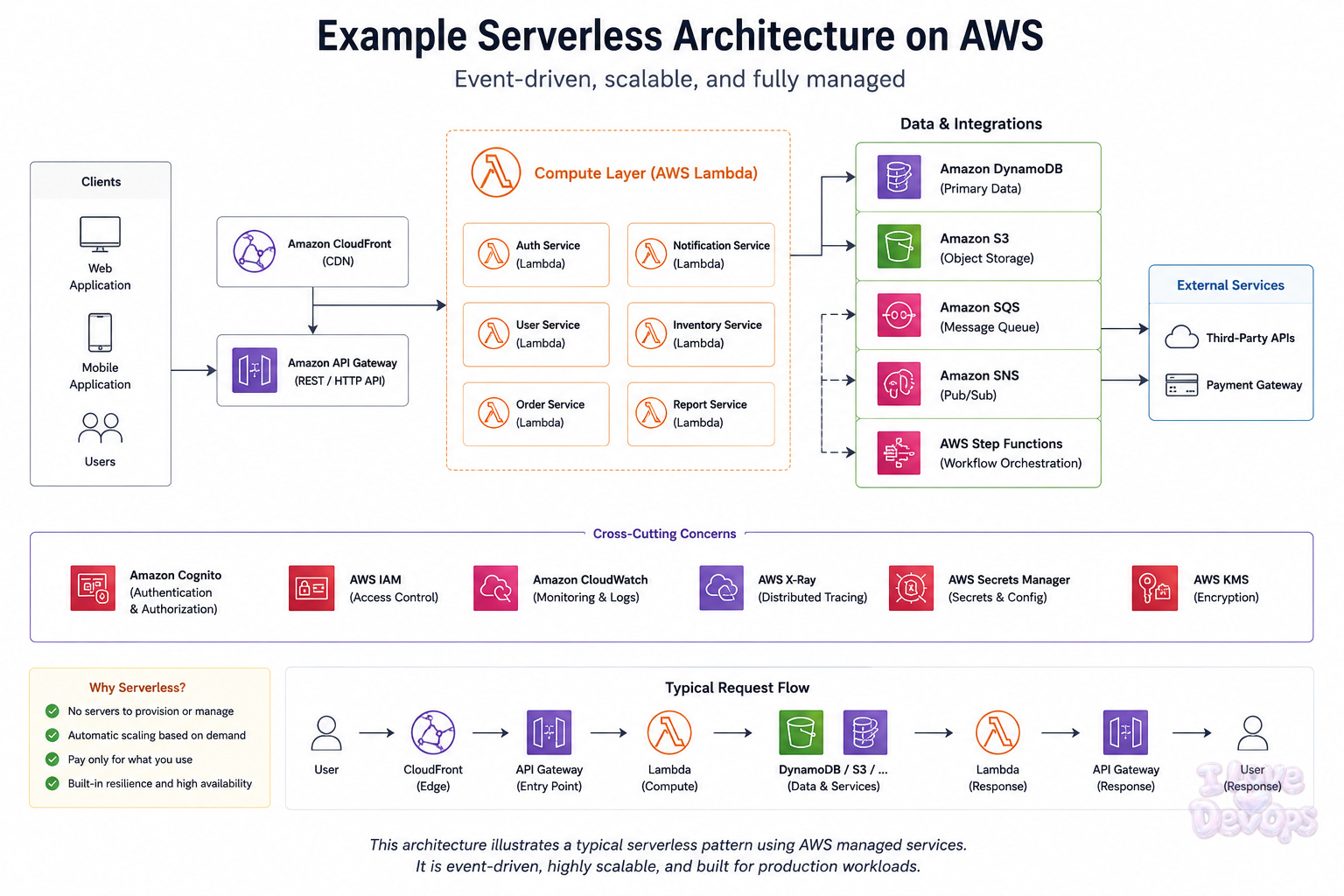
Request arrives → API Gateway routes it → Lambda service receives it → Execution environment activates → Your code runs → Response returns
That middle part, “execution environment activates,” is where everything interesting happens.
Execution environments
When Lambda runs your function, it needs a place to run it. That place is an execution environment: a lightweight container with your code, your runtime, and whatever dependencies you packaged. AWS manages a pool of these environments.
If an environment already exists from a recent invocation, your function runs immediately. This is a warm start. The environment is sitting there, your code is loaded, your global variables still hold their values from last time.
If no environment exists, Lambda has to create one. This is a cold start. It means downloading your deployment package, initializing the runtime, running your initialization code, and only then executing your handler.
Cold starts on a Node.js function with minimal dependencies might add 100-200ms. Cold starts on a Java function with Spring Boot can add 10-15 seconds.
That’s not a bug. That’s the architecture.
The concurrency model
Each execution environment handles exactly one request at a time. If 100 requests arrive simultaneously, Lambda creates 100 execution environments. Each one initializes independently. Each one opens its own database connections. Each one consumes memory.
This is radically different from a container running Express.js that handles hundreds of concurrent connections in a single process. The isolation is a feature for some workloads and a catastrophe for others.
Provisioned concurrency
AWS’s answer to cold starts is provisioned concurrency. You tell Lambda to keep N environments warm at all times. They’re ready to handle requests instantly, no initialization delay.
The catch: you pay for those environments whether they’re serving requests or not. At that point, you’re paying for capacity. The economic model starts looking a lot like containers.
resource "aws_lambda_provisioned_concurrency_config" "api" {
  function_name                     = aws_lambda_function.api.function_name
  provisioned_concurrent_executions = 10
  qualifier                         = aws_lambda_function.api.version
}
Ten warm environments cost roughly the same as running a small container 24/7. The math only works if your traffic pattern genuinely can’t be served by always-on compute.
What Production Actually Looks Like
The serverless sales pitch focuses on what you don’t have to manage. Production reality includes everything you still have to manage, plus new categories of operational work you didn’t have before.
Observability becomes harder
Your container application has a process. That process has logs, metrics, a debugger you can attach, state you can inspect. A Lambda function is ephemeral. It exists, runs, disappears.
CloudWatch Logs captures output, but correlating a single request across multiple function invocations requires distributed tracing you wouldn’t need in a monolith. X-Ray helps. It also adds latency and cost.
The short version: serverless doesn’t reduce your observability needs. It restructures them.
Local development is a lie
SAM Local and LocalStack simulate Lambda environments. They don’t replicate them. The IAM permission model is different. The network topology is different. The cold start behavior is different.
I’ve seen teams spend weeks debugging issues that only manifested in the real AWS environment because local simulation told them everything was fine. The feedback loop lengthens. Iteration slows.
Deployment gets weird
Updating a Lambda function isn’t like updating a container. You’re uploading a new artifact and telling AWS to use it. There’s no rolling deployment built in, there’s no automatic rollback on failure.
Traffic shifting with aliases helps:
resource "aws_lambda_alias" "live" {
  name             = "live"
  function_name    = aws_lambda_function.api.function_name
  function_version = aws_lambda_function.api.version

  routing_config {
    additional_version_weights = {
      "${aws_lambda_function.api.version}" = 0.1
    }
  }
}
You can route a tenth of your traffic to a new version and watch for errors. But you have to build that. It’s not default behavior.
Cost accounting is genuinely different
Lambda charges by invocation count and execution duration. A million invocations of a 100ms function with 128MB memory costs about $0.20 for compute plus $0.20 for requests.
Sounds cheap. Often is cheap.
But.
Those functions talk to other services. API Gateway charges per request. DynamoDB charges per read/write capacity unit. SQS charges per message. CloudWatch charges per log ingestion.
The function compute cost is frequently less than half your actual serverless bill. I’ve seen teams celebrate Lambda costs dropping while their total AWS spend increased because they didn’t account for the supporting services.
The Failure Modes You’ll Actually Hit
These aren’t theoretical edge cases. These are the problems I see production teams encounter repeatedly.
1. The cold start that kills your SLA:
Your API has a P99 latency target of 500ms. Most requests complete in 80ms. But when a function cold-starts during a burst, that request takes 3 seconds. Your monitoring shows P99 at 2.8 seconds. Nobody’s happy.
The frustrating part is that this only shows up under specific traffic patterns. Steady traffic keeps environments warm. Traffic that drops to zero overnight and spikes in the morning hits cold starts every morning. Traffic that bursts unpredictably hits cold starts during every burst.
Try to analyze your actual traffic patterns before committing to Lambda for latency-sensitive workloads. Provisioned concurrency helps but changes the economics. Sometimes the answer is that Lambda isn’t the right tool.
2. The connection pool explosion:
Your function connects to PostgreSQL. Each execution environment opens its own connection. A traffic spike creates 500 concurrent environments. Your database accepts 100 connections maximum.
400 function invocations fail with connection errors. Users see 500s. Your database is fine. Lambda is fine. The mismatch between their concurrency models broke you.
The fix is RDS Proxy or a similar connection pooling layer. It sits between Lambda and your database, multiplexing hundreds of Lambda connections onto dozens of database connections. It works well. It also adds latency and cost. And it’s something you don’t need with a container that manages its own connection pool.
3. The execution duration timeout:
Lambda functions have a maximum execution time. Currently 15 minutes. Your batch job runs in 12 minutes normally. One day the upstream API is slow, your function takes 16 minutes, it gets terminated mid-execution.
No graceful shutdown. No partial progress saved. Just death.
You find out from a user complaining that their export never arrived.
Try to build checkpointing into anything that approaches timeout limits. Better yet, if your workload genuinely needs more than 15 minutes, Lambda isn’t the right tool. Use Step Functions for orchestration or just run a container.
4. The payload size wall:
Synchronous Lambda invocations have a 6MB request/response payload limit. You’re building an image processing pipeline. Everything works in testing with reasonably sized images. Production receives a 12MB PNG. Lambda rejects the request before your code even runs.
The fix is architectural: use S3 as an intermediary. Function receives an S3 reference, reads the object, processes it, writes the result back. But now you’re managing S3 buckets, presigned URLs, cleanup of temporary objects. The simplicity eroded.
5. The dependency bloat spiral:
Your deployment package starts at 5MB. You add a library for PDF generation. Now it’s 45MB. You add ML inference dependencies. Now it’s 200MB and Lambda won’t deploy it without using container images.
Container images work but change the deployment model and add cold start latency. What started as “just upload your code” becomes container registry management, image scanning, layer caching strategies.
Try to audit your dependencies ruthlessly. Tree-shake. Use Lambda Layers for shared code. And accept that some workloads simply don’t fit the serverless deployment model.
The Terraform Part That’s Obnoxious
Infrastructure as code for serverless hits weird edges that IaC for containers doesn’t.
Version management creates drift
Lambda functions have versions. Aliases point to versions. When you update a function, Terraform creates a new version. If you’re using aliases for traffic management, you need to update the alias to point to the new version.
resource "aws_lambda_function" "api" {
  filename         = data.archive_file.lambda_zip.output_path
  source_code_hash = data.archive_file.lambda_zip.output_base64sha256
  function_name    = "api-handler"
  role             = aws_iam_role.lambda_exec.arn
  handler          = "index.handler"
  runtime          = "nodejs18.x"

  publish = true
}
Setting publish = true creates a new version on every change. But now your alias needs to track that version, and if you’re doing canary deployments, you need to manage the weights. The state management gets complex fast.
API Gateway integration is verbose
Connecting API Gateway to Lambda requires multiple resources: the API itself, resources for each path, methods for each HTTP verb, integrations linking methods to Lambda, permissions allowing API Gateway to invoke Lambda.
A simple REST API with five endpoints can mean 30+ Terraform resources. Modules help but obscure what’s happening.
resource "aws_api_gateway_rest_api" "api" {
  name = "api"
}

resource "aws_api_gateway_resource" "users" {
  rest_api_id = aws_api_gateway_rest_api.api.id
  parent_id   = aws_api_gateway_rest_api.api.root_resource_id
  path_part   = "users"
}

resource "aws_api_gateway_method" "users_get" {
  rest_api_id   = aws_api_gateway_rest_api.api.id
  resource_id   = aws_api_gateway_resource.users.id
  http_method   = "GET"
  authorization = "NONE"
}

# ... plus integration, plus lambda permission, plus deployment, plus stage
HTTP API (v2) simplifies this significantly. If you’re starting fresh, use it instead of REST API unless you specifically need features REST API provides.
IAM permissions sprawl
Each Lambda function needs execution role permissions for whatever AWS services it touches. S3 read here, DynamoDB write there, SQS receive somewhere else.
Least privilege means many role policy documents. Broad permissions mean security concerns. The balance is tedious to maintain, and Terraform’s IAM policy documents are notoriously unreadable.
If you’re building serverless at scale, invest in policy templating early. My article about IAM Identity Center covers strategies that scale better than inline policies.
The circular dependency trap
Lambda needs permission to be invoked by API Gateway. That permission references the API Gateway ARN. The API Gateway integration references the Lambda ARN. Terraform usually resolves this, but I’ve seen configurations where dependency ordering breaks and you need depends_on annotations to force the sequence.
The Uncertainty I Can’t Resolve
Serverless vs. containers isn’t a technical question with a technical answer. It’s a context-dependent tradeoff that genuinely depends on factors I can’t know about your situation.
Team composition matters enormously
A team with strong AWS experience and weak container orchestration skills will be more productive with Lambda. A team comfortable with Kubernetes will find Lambda’s constraints frustrating and its debugging experience primitive.
Neither preference is wrong. The same workload can succeed on either platform with the right team.
Traffic patterns change everything
Serverless economics favor spiky traffic with long idle periods. If your function runs 20 times per day, Lambda is obviously cheaper than keeping a container running. If your function runs 20 times per second continuously, containers are almost certainly cheaper.
The break-even point sits somewhere in the middle, and I’ve seen it vary by nearly 2x depending on memory configuration, execution duration, and what “cheap” means to a given organization.
Regulatory constraints limit choices
Some compliance regimes require you to know which physical hardware your workload runs on. Serverless can’t provide that. Other compliance regimes just need evidence of encryption and access control, which serverless handles elegantly.
I can’t tell you which applies to you.
Migration costs are real
If you’re already running containers successfully, migrating to serverless has a cost. If you’re already running serverless and hitting walls, migrating to containers has a cost. “Optimal architecture” matters less than “architecture your team can operate.”
What Happens When Serverless Works
When the workload genuinely fits, serverless delivers benefits you can’t easily replicate elsewhere.
Event-driven pipelines become trivially scalable. S3 upload triggers Lambda, Lambda processes file, results land in DynamoDB. No scaling configuration. No capacity planning. It just handles whatever volume arrives.
Operational burden genuinely drops. No patching EC2 instances. No managing Kubernetes control plane upgrades. No worrying about node group autoscaling limits during traffic spikes.
Cost for sporadic workloads approaches zero. Internal tools that run once per day cost pennies per month instead of dollars per hour for idle compute.
Deployment velocity increases. Update a function in seconds. Test immediately. No waiting for container builds or instance replacement.
The quietest win I’ve seen was on a team that migrated their webhook processors to Lambda. These handlers received external events, validated them, and forwarded them to internal queues. Previously they ran on an EKS cluster with dedicated capacity because the traffic was unpredictable. The cluster cost around a thousand dollars a month to handle an average of 10 requests per minute.
After migration to Lambda, the workload cost less than ten dollars a month. Ten freaking dollars. Nobody presented that at an all-hands. It didn’t appear on any OKR. But that team’s quarterly AWS budget dropped noticeably, and they stopped getting paged about webhook processor pod restarts.
That’s the real serverless value: the work that disappears so completely you forget you used to do it.
What’s your experience been? I’m particularly curious whether teams who started serverless-first feel the same constraints as those who migrated from containers. I’d love to hear about it in the comments.
With Love and DevOps,
Maxine

If you made it this far and you’re managing cloud infrastructure with Terraform, you might want to keep this one close too.
What Is Infrastructure as Code? A Beginner’s Guide to Terraform and Cloud Infrastructure
is where I start people who are new to IaC or who understand it conceptually but haven’t had to debug it in a real environment yet. It covers the mental model behind declarative infrastructure so that articles like this one make sense end to end, not just the code snippets.
And if you’re working with AI in your stack or trying to understand where LLMs actually fit in a production system without the hype, LLMs for Humans: From Prompts to Production is the guide I wish existed when I started. Written by an engineer for engineers, covering RAG, function calling, and the operational reality of running AI in real systems.
Last Updated: May 2026
Sources and Further Reading
AWS Lambda Execution Environment
Understanding AWS Lambda Cold Starts
Yes good work
imagine I'm your student