
When to Use a Cache (And When You're Just Making Things Worse)
Easy to implement. Hard to operate. Here’s what caching looks like in production.

A well-placed cache turns a struggling system into a responsive one.
Faster reads. Lower database load. Happy users.
A poorly-placed cache turns a simple system into a debugging nightmare.
I watched a team spend three weeks troubleshooting what they thought was a database issue. Queries timing out, and users seeing stale data, ,meanwhile the database team kept saying everything looked fine, and they were right. It was fine.
The problem was a cache that had grown to hold thousands of keys, most of which were invalidated incorrectly, some of which were never invalidated at all, and a few that were being written faster than they could be read. The “optimization” they’d added six months earlier had become the single biggest source of production incidents.
The thing about caching is that it’s easy to implement and hard to operate. You can add Redis to your stack in an afternoon. Understanding whether you should takes time, and understanding what will break it takes even longer.
In order for that to happen, let’s understand what’s happening under the hood so that when it breaks, and it will break, you know where to look.
Hi I’m Maxine, a cloud infrastructure engineer who spends my days scaling databases, debugging production incidents, and writing about what actually works in production.
You can get a copy of my LLMs for Humans: From Prompts to Production (at 30% off right now) ←
Or for free when you become a paid subscriber.
It’s 20 chapters of practical applied AI with real production context, not theory. And it’ll help you get smarter about using AI tools in infrastructure workflows.

Checkout my work:
Plus, if you’re thinking about making a career move into cloud or DevOps and want a structured path to get there, get a copy of my The DevOps Career Switch Blueprint.
Okay, let’s get into it
The Actual Architecture of a Cache Hit
Before we talk about when to cache, we need to talk about what caching actually does to your system’s behavior, most explanations stop at “it makes things faster.” That’s not enough.
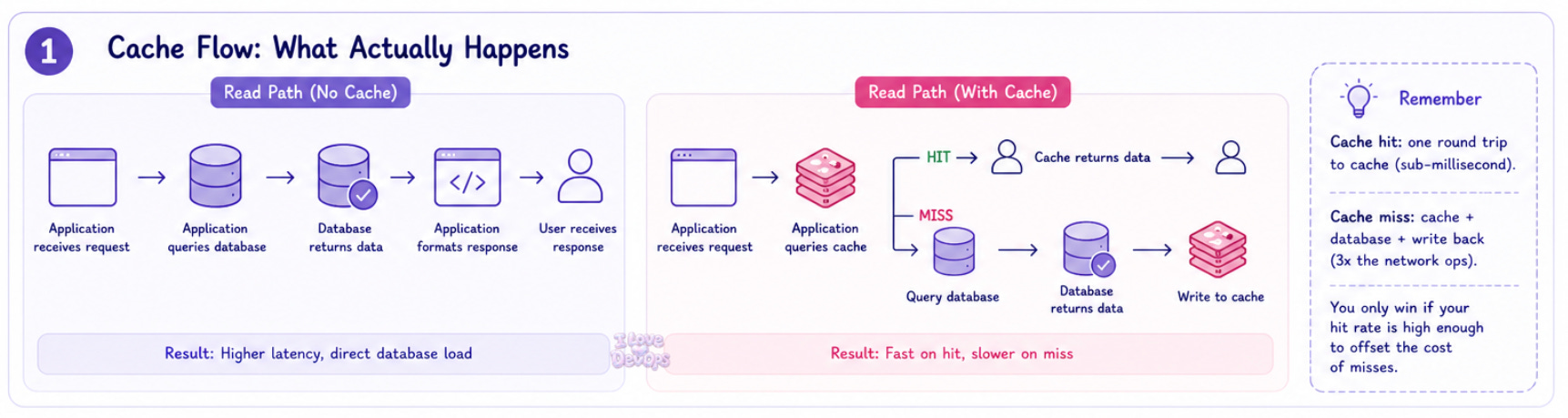
Read path without cache:
Application receives request → Application queries database → Database returns data → Application formats response → User receives response.
Read path with cache:
Application receives request → Application queries cache → Cache returns data or cache returns nothing → If nothing, application queries database → Database returns data → Application writes to cache → Application formats response → User receives response.
That second path has more steps.
More network hops.
More failure modes.
The cache only saves you time when you hit, but when you miss, you’ve added latency.
This is usually the first thing people forget.
Cache hit: One round trip to your cache layer, typically sub-millisecond for Redis or Memcached on the same network.
Cache miss: One round trip to cache, one round trip to database, one write back to cache. You’ve tripled your network operations.
The math only works if your hit rate is high enough to offset the cost of misses. A 50% hit rate on a 100ms database query with a 1ms cache lookup doesn’t save you 50ms on average. It costs you an extra millisecond on every miss.
Let’s look at the components:
Component one: The cache store itself. Redis, Memcached, or an in-process cache like Caffeine or a simple dictionary. Each has different characteristics for eviction, clustering, and persistence. Redis gives you data structures and optional persistence. Memcached is simpler but scales differently. In-process caches avoid network overhead but don’t share state across instances.
Component two: The cache key strategy.
This is where most caching goes wrong. Your key needs to uniquely identify the cached data, but it also needs to be invalidatable. If you cache user data under user:123, you can invalidate it when user 123 changes. If you cache a query result under recent_orders_page_1, how do you know when to invalidate it? When any order changes? When any order that might appear on page 1 changes? You’ve created a problem.
Component three: The invalidation strategy.
Time-based expiration (TTL), event-based invalidation, or both. TTL is simple but means your data is eventually consistent at best. Event-based invalidation is precise but requires your application to know every place data might be cached and to emit the right events at the right times.
Here’s a basic pattern in pseudocode:
def get_user(user_id):
    cache_key = f"user:{user_id}"

    cached = cache.get(cache_key)
    if cached is not None:
        return deserialize(cached)

    user = database.query("SELECT * FROM users WHERE id = ?", user_id)

    cache.set(cache_key, serialize(user), ttl=3600)

    return user

def update_user(user_id, data):
    database.update("UPDATE users SET ... WHERE id = ?", data, user_id)
    cache.delete(f"user:{user_id}")
Simple enough.
Now consider what happens if the cache delete fails? What if there’s a network partition between your application and Redis? What if you have ten application servers and they each have a slightly different view of what’s cached?
Those questions are where the real architecture lives.
What Production Actually Looks Like
Here’s the uncomfortable truth about caching in production: the scenarios that break you are almost never the ones you planned for.

The hit rate lie. You’ll add caching to a query because it’s slow. In staging, you’ll see an almost perfect hit rate. Beautiful. In production, you’ll see less than half. The difference is traffic patterns. Your staging environment has you and maybe a few other developers hitting the same data repeatedly. Production has thousands of users each accessing their own unique slice of data. Your cache fills up with keys that get accessed once and never again.
I’ve seen Redis instances where most of the keys were accessed exactly once before expiring. That’s not a cache, that’s just expensive temporary storage.
The memory cliff. Caching is free until it isn’t. You start with a small Redis instance, 1GB of memory, plenty of room. Then the cache grows, it hits the memory limit, and eviction kicks in.
Here’s the thing about eviction policies: they all have failure modes.
allkeys-lruevicts the least recently used key regardless of what it is. That cached configuration object you rely on? Gone, because nothing accessed it in the last hour.volatile-lruonly evicts keys with TTL set. If you have a mix of permanent and temporary keys, you might evict the temporary ones that are frequently hit while keeping the permanent ones that nobody uses.noevictionrefuses to evict anything. Your writes start failing. Your application starts crashing.
Pick your poison.
The thundering herd. A popular cache key expires → One hundred requests come in simultaneously → All hundred check the cache → All hundred see a miss → All hundred query the database → All hundred write to the cache.
Congratulations 🎉, you’ve turned a caching layer into a DDoS amplifier.
The fix is called request coalescing or single-flight. Only one request actually fetches from the database while the others wait:
var group singleflight.Group

func getUser(userID string) (*User, error) {
    result, err, _ := group.Do(userID, func() (interface{}, error) {
        // Only one goroutine executes this
        user, err := fetchFromDB(userID)
        if err != nil {
            return nil, err
        }
        cache.Set(userID, user, time.Hour)
        return user, nil
    })

    if err != nil {
        return nil, err
    }
    return result.(*User), nil
}
Most caching tutorials don’t mention this, but most production caches need it.
The cold start problem. Your Redis instance restarts. Your cache is empty. Every request becomes a cache miss. Your database, which has been cruising at a third of the capacity because the cache was absorbing more than half of the reads, suddenly receives 100% of the reads.
This is why you need to know your database can handle the full read load without the cache. If it can’t, you don’t have a performance optimization, you just have a single point of failure.
Cache Failure Modes
Someone opens a ticket saying the application is showing old data: Users updated their profile pictures three hours ago, but they still see the old ones. Sometimes. On some pages.
It isn’t a database bug. It isn’t a replication lag issue.
It’s partial cache invalidation.
You invalidated the user object when the profile picture changed, but you forgot about the cache key for the user’s profile page rendering. And the cache key for the user list that appears in search results. And the CDN cache for the avatar image URL. The data is correct in five places and stale in three, and the user sees a different combination depending on which application server handles their request.
Symptom: Intermittent stale data.
Technical cause: You’re caching derived data without tracking all the source data it depends on. When source data changes, you don’t know all the derived caches that need invalidation.
Fix: Either cache only source data (not derived data), or build a dependency graph that tracks which caches depend on which data and invalidates the full tree.
Symptom: Data corruption after deploys.
Technical cause: You changed the structure of your cached data but didn’t change the cache key. Old serialized data is being deserialized into new data structures.
Fix: Version your cache keys. user:v2:123 instead of user:123. When you change the data format, bump the version. Old keys will naturally expire while new requests use the new format.
CACHE_VERSION = "v3"

def cache_key(prefix, id):
    return f"{prefix}:{CACHE_VERSION}:{id}"
Symptom: Memory grows indefinitely even with TTL.
Technical cause: You’re generating cache keys from user input without normalization. user:123, user: 123, user:123 , and USER:123 are all different keys pointing to the same data.
Fix: Normalize and sanitize all components of your cache keys before use.
Symptom: Application latency spikes every hour on the hour.
Technical cause: You set all your TTLs to nice round numbers, everything expires at the same time. Welcome to your synchronized stampede.
Fix: Add jitter to your TTLs:
import random

def ttl_with_jitter(base_ttl):
    jitter = random.uniform(0.8, 1.2)
    return int(base_ttl * jitter)

cache.set(key, value, ttl=ttl_with_jitter(3600))
Now your expirations are spread across a 20-minute window instead of all hitting at 3600 seconds.
The Terraform Parts That Fight Back
Provisioning a Redis cluster in Terraform looks simple. It isn’t.
resource "aws_elasticache_cluster" "cache" {
  cluster_id           = "production-cache"
  engine               = "redis"
  node_type            = "cache.r6g.large"
  num_cache_nodes      = 1
  parameter_group_name = aws_elasticache_parameter_group.cache.name
  port                 = 6379
  security_group_ids   = [aws_security_group.cache.id]
  subnet_group_name    = aws_elasticache_subnet_group.cache.name
}
That’s a single-node cluster. No replication. No failover. Adequate for development, dangerous for production.
For production, you want a replication group:
resource "aws_elasticache_replication_group" "cache" {
  replication_group_id       = "production-cache"
  description                = "Production Redis cluster"
  engine                     = "redis"
  engine_version             = "7.0"
  node_type                  = "cache.r6g.large"
  num_cache_clusters         = 3
  automatic_failover_enabled = true
  multi_az_enabled           = true
  at_rest_encryption_enabled = true
  transit_encryption_enabled = true

  parameter_group_name = aws_elasticache_parameter_group.cache.name
  subnet_group_name    = aws_elasticache_subnet_group.cache.name
  security_group_ids   = [aws_security_group.cache.id]
}
Here’s where it gets messy.
The engine version upgrade trap.
You can’t change engine versions on an existing replication group without downtime. Terraform will try to modify in place, the API will reject it, and you’ll get an error that doesn’t clearly explain the problem. The workaround is to create a new replication group, migrate traffic, and destroy the old one. No clean Terraform path exists.
The parameter group dance.
Changing certain parameters requires a reboot. Terraform doesn’t know which ones. You’ll apply a change, it will succeed, and the parameter won’t actually take effect until you manually reboot the nodes. The apply_immediately argument helps but doesn’t cover all parameters.
resource "aws_elasticache_parameter_group" "cache" {
  family = "redis7"
  name   = "production-cache-params"

  parameter {
    name  = "maxmemory-policy"
    value = "allkeys-lru"
  }

  parameter {
    name  = "timeout"
    value = "300"
  }
}
The subnet group immutability.
You cannot change the subnet group of a running replication group. If you realize you put your cache in the wrong subnets, you’re recreating the cluster.
The security group timing issue.
If your cache security group references an application security group that doesn’t exist yet, your apply will fail. But if you create them in separate applies, you have a window where the cache exists but isn’t accessible. Use depends_on explicitly:
resource "aws_elasticache_replication_group" "cache" {
  # ... config ...

  depends_on = [
    aws_security_group.application,
    aws_security_group_rule.cache_ingress
  ]
}
I wish I had a cleaner answer. I don’t. ElastiCache and Terraform have an uneasy relationship, and the only way through is careful planning and accepting that some changes require a migration rather than an in-place update.
When Caching Actually Makes Things Worse
Here’s the part most caching articles won’t tell you: sometimes you shouldn’t cache at all.

Don’t cache when your hit rate will be low.
If every request needs different data, caching adds latency without benefit. User-specific data that changes frequently, highly parameterized queries, and data that’s accessed once per session are all bad candidates.
Don’t cache when freshness matters more than speed.
Financial data. Inventory counts. Anything where showing stale data is worse than showing slow data. Yes, you can cache with very short TTLs, but at some point the operational complexity outweighs the performance benefit.
Don’t cache when your database isn’t actually the bottleneck.
I’ve seen teams add caching to a system where the slow part was their own application code, not the database query. Profile first. Cache second.
Don’t cache when you can’t invalidate correctly.
If you can’t articulate exactly when a cached value becomes stale and exactly how you’ll detect that, don’t cache it. Hope is not an invalidation strategy.
I’m genuinely uncertain about caching in distributed systems with multiple writers. The theory says you can do it with careful invalidation and coordination. The practice says you’ll get it wrong in subtle ways that only manifest under specific timing conditions that you can’t reproduce in testing. I’ve seen it work. I’ve seen it fail spectacularly. The difference usually comes down to how well the team understood their data access patterns before they started, and most teams don’t understand them as well as they think they do.
The Hidden Payoff

When caching works, you stop thinking about it. That’s the payoff:
Your database metrics flatten.
Your P99 latency drops.
Your alerts stay quiet.
The pager doesn’t wake you up because the system that used to buckle under load now handles it without complaint.
The real value isn’t speed. It’s stability.
A well-tuned cache absorbs traffic spikes, it provides a buffer between your users and your slowest dependencies. It lets you deploy database maintenance windows without users noticing because reads can still be served from cache.
The absence of incidents is hard to quantify in a dashboard. But it’s real.
The team that spent three weeks debugging that cache problem? Once they fixed it, once they understood their access patterns and invalidation requirements, they went eight months without a cache-related incident. The system got faster, yes. But mostly it got boring.
Boring is the goal.
What’s your current cache hit rate, and have you actually measured it or are you assuming?
I’d love to hear about your experiences.
With Love and DevOps,
Maxine

If you made it this far and you’re managing cloud infrastructure with Terraform, you might want to keep this one close too.
What Is Infrastructure as Code? A Beginner’s Guide to Terraform and Cloud Infrastructure
is where I start people who are new to IaC or who understand it conceptually but haven’t had to debug it in a real environment yet. It covers the mental model behind declarative infrastructure so that articles like this one make sense end to end, not just the code snippets.
And if you’re working with AI in your stack or trying to understand where LLMs actually fit in a production system without the hype, LLMs for Humans: From Prompts to Production is the guide I wish existed when I started. Written by an engineer for engineers, covering RAG, function calling, and the operational reality of running AI in real systems.
Last Updated: May 2026